Stop Instagramming and get a life: How cell phone cameras ruin real moments

stop instagramming camera phones

Having access to a camera 24/7 doesn’t mean you have to use it. In many cases, the world would actually be a better place if you just left it in your pocket.

On a recent episode of Leo Laporte’s podcast This Week in Tech, panelist Dwight Silverman spoke briefly about a concert featuring David Byrne and St. Vincent. Prior to the performance, Byrne told the audience that smartphone photography was encouraged, but that they should put down their iPads.

As anyone who has ever seen a 10-inch screen held aloft in a concert can attest, iPads can be a severe distraction, making Byrne prescient as ever. However, I don’t think he goes far enough. As great as ubiquitous camera access is, we might all be better off if we used our camera phones less often. Here’s why – whether you’re at a concert or just out for a walk in the woods.

It distracts others

Getting close to one of our favorite performers can make us want to document that experience. But no one wants an iPad screen blocking their view. Concerts are best enjoyed when there is little inhibiting the interaction between performers and audience. An iPad between you and the performer on stage will be a significant impediment to appreciating a performance. Bravo, David Byrne, for dissuading the inconsiderate from ruining things for the rest of the audience.

I would actually encourage him to go further, and ban all mobile devices. Phones may not be as large a disruption as a tablet, but they are a distraction nonetheless. Plus, where do you draw the line? “Phablets” like the 5.5-inch Samsung Galaxy Note 2 make the distinction so difficult, it would be far better to simply ban them all.

It distracts you

Not only is shooting video at a performance going to distract others, it will distract you as well.

You only have so much attention to go around. If you want to record a quality video, you have to shift too much of your attention to making that recording good. That leaves little attention left to appreciate what’s happening on stage — and that’s not even considering the distraction of tired arms at the seven-minute mark of a nine-minute song.

Shooting video also prevents you from physically engaging with the performance. If you go see The Hives, you will want to dance or jump around far more than you will want to have a camera in your hands. Trust me.

Audio is better

Nobody wants to see that grainy cell-phone video that you shot from the 40th row. Bootlegging communities for bands like Phish and The Grateful Dead indicate that someone may want to hear an audio recording, though. In that case, you will need better microphones than those in your smart phone.

The $100 Mikey Digital (which attaches to an iOS device) and the $270 Zoom H4n are great for bootlegging. Both will create far better recordings than you can make with a phone alone. The Zoom H4n is especially feature rich, and sounds great as well. I use one regularly and have really enjoyed the recordings it creates.

Mikey Digital ios attachable microphoneBonus: When recording audio, it’s actually a bad idea to move around, and in most cases you won’t change the settings on your recording device, either. This means no bright screens to distract others and less oversight to distract you. Everybody wins!

Just make sure to get performer consent before creating a bootleg, and make sure that they are aware of and approve any releases of the recordings you create.

It trivializes an experience

An emphasis on documentation can also cheapen other experiences by reducing them to a few still frames.

Hiking is a good example, even though I admit I don’t go much myself. Snapping cell-phone shots of a hike trivializes the experience of hiking. Is hiking about a photograph of a far off mountain, or is it about removing yourself from a higher-frequency world to one more tranquil, and moving through a different environment in an enjoyable, strenuous way?

Photos prioritize destinations. Hiking seems to be more about the journey. Plus, is your camera phone really going to do that view justice? If you want an excellent photo, bring a DSLR and some good lenses. Absent that, concentrate on enjoying the view while there, and don’t distract yourself with poor facsimiles of the view to enjoy later.

It intrudes on the experience

One of the most important things about hiking or camping is that it takes you away from technology. Sorry, Tom Haverford, you don’t need DJ Roomba. You need to unplug for a minute and get away from the radiation of the city.

Your Instagram of the campfire does prove that you slept in the woods, but it also hopelessly detracts from that experience. You should be focused on roasting smores, not creating second-rate pseudo-Polaroids with what amounts to a tiny computer. Using high-tech devices to memorialize an experience that is largely defined by getting away from high-tech devices seems to miss the point.

It creates clutter

Our ability to easily capture photos, video, and audio anywhere we go with nearly unlimited storage adds a nearly impossible amount of clutter to our lives. Take photos, for example. You aren’t going to take one photo of that rad piece of graffiti. You will probably take several and then use the best one. You still have to do something with those other photos, though.

If you take hundreds of pictures, then those are hundreds of pictures that you need to deal with. You have to pare them down to the few best ones. They may need to be processed, resized, or cropped. If you want to be careful, the ones that you like most should be backed up somewhere.

instagram food camera phonesThis can add a lot of overhead, and most non-photographers don’t have good workflows to get it done. For example: Why do I have a photo of the last pork tenderloin sandwich I had when last in Indiana? There was no reason to take it in the first place. Now it is a useless piece of digital clutter. Plus, it made my phone greasy when I took it, and now I really want a pork tenderloin sandwich — both big negatives.

It makes us worse people

Yes, your friend’s compound fracture is fascinating in a horrifying sort of way, but I might be better off if I didn’t have opportunities to see things like that online. There would be a lot less fodder for /r/wtf (not to mention even less-savory sub-Reddits) if we didn’t all have decent-quality phones in our pockets. And that’s to say nothing of the feelings of the injured party.

We may be at our very worst as a species when we’re rubber-necking for a longer glance at the suffering of others. Ubiquitous camera access feeds this behavior directly, as we take more time to get photos and personally appreciate them later, and vicariously, as we encourage others to enjoy another’s pain with us. Sites like Reddit make this even worse, as the most gruesome injuries will also be rewarded with viral attention.

If we were more restrained with our camera phones, perhaps there would be a little less celebration of the terrible things around us.

Conclusion

David Byrne would never get away with banning cell phones from his performances. The uproar would be too great. This one has to be on us.

The next time you are at a concert, put down the camera phone. Focus more on the performance and you might just enjoy it more. If you are hiking or camping, leave your phone in your pocket. Don’t miss the point of the whole endeavor. And, for goodness sake, if you happen to be at the scene of an injury, accident, or tragedy, have some decency and don’t snap a shot to share online. We might just all be better off.


Source : digitaltrends[dot]com

How to go under Android's hood

How to go under Android's hood

LauncherPro enables you to add extra functionality to your home screen

Smartphones represent the pinnacle of mobile technology, but they're not without their flaws. For example, we still communicate by texting when really we should be doing it another way. Although most people are happy to accept convention, that doesn't mean we're doing things as well as we can.

Enlightened types, however, understand that the great thing about smartphones - Android phones in particular - is that they can be upgraded to address certain bad habits. A phone's usability can be dramatically improved with a few minor changes to the way we do things.

One great way of cutting down on the amount of typing you have to endure each day is to download the nifty Swype app for Android. Once installed, it integrates with your keyboard settings and replaces the standard Android keyboard with Swype's own, enabling you to - as the name implies - use swipes of the keyboard to form words, instead of having to press individual keys.

It's much faster and surprisingly accurate. Swype is still in beta so it's not yet available on the Google Play store. It comes pre-installed on some Android phones.

Security pattern

Unfortunately, Swype doesn't play nicely with the Android lock screen, so if you want to use its swiping text predication to unlock your screen each time, you'll have to look elsewhere.

Make Android easier

Thankfully you won't have to go too far, because you can set a Swype-esque security password using Android's own settings, which enable you to use a pattern instead of a PIN.

In the Settings menu, go to 'Location & security' and tap on 'Change screen lock'. If you already have a password for your phone, enter this and then choose 'Pattern' from the menu. Tap 'Next' and 'Next' once more, then draw your chosen pattern and repeat it to confirm it.

Now, each time you wake your phone from sleep you can simply draw the lock pattern you chose instead of typing words and numbers.

Make Android easier
Voice search

If the thought of using your fingers to type more than a couple of words makes you want to hide, there are ways to cut down on your tapping time.

By using Voice Search - which, again, is built into your Android phone - you can do away with your current method of text input and use speech instead.

Make Android easier

It's easy to use, and can be used in a variety of situations. For example, when you're searching for something online, just tap the voice button and say what you want to find.

When you're composing a text message, you can say the recipient's name.

You can even dictate sat nav directions to the Navigation app, enabling you to get from A to B quicker.

If you're looking for a more visual way of searching, Gesture Search is the perfect app.

Instead of looking through various menus to find the file or app you want, you simply draw the name of what you're looking for.

Make Android easier

Obviously, it's easier to find what you want if you know the full name, but if you don't, the app will learn what you search for regularly, so you'll get more accurate results over time.

Similarly, SwipePad gives you easy access to all the rest of the apps on your phone no matter where you are - whether you're browsing the web, playing a game or adjusting your settings.

Just swipe from a preset corner of your screen towards the centre and your apps magically appear on top of whatever you're doing.

To select one, simply release your finger while you hover over its icon.

Control your talk time

Beyond simple ways of speeding up common tasks on your phone, there are many things you can do to make life with your smartphone easier.

If you find yourself regularly picking up your phone to handle incoming calls, an app called Super Missed Call can seriously cut down on the amount of time you spend dealing with a ringing phone thanks to the way it enables you to control your talk time.

When you want to ignore a caller, you can simply rest your phone on its screen. When you pick it up again, Super Missed Call will automatically phone that person back for you, meaning there's the bare minimum of intervention on your part.

Make Android easier

You can even schedule missed calls so that you'll get a reminder to call people back - which is useful if you tend to be forgetful or you just lead a very busy life.

Another way of dealing with all notifications - not just phone calls - is to channel them away from your actual phone to another device so that you can deal with them more efficiently.

When you use Android Notifier, which sends your messages, phone calls or emails from your phone to your desktop or laptop PC, there's no need to get your phone out while you're busy at work - you can deal with everything on one machine.

If you really must have your phone in front of you at all times, Smart Screen is a neat way of making it easier to check what's on the screen. This app enables you to wave your hand over the screen to turn it on or off.

No, it's not a Jedi trick - it works by using the phone's built-in proximity sensor. In case you were wondering, you can adjust the sensitivity of the app so you don't accidentally set it off while it's in your pocket.

Get a handier home screen

The standard home screen on an Android phone isn't really designed with usability in mind. Apps and functions are hidden away in off-screen menus, so there's no way of getting quick access to the things you need.

With a couple of modifications you can make your home screen work the way you want it to. For starters, you can move your favourite apps to the home page so you can access them without delving into the main menu.

If that's not enough, you can go a step further and install LauncherPro, which enables you to fully customise your home screen for maximum usability. This tool enables you to do some really useful things, such as categorising your apps by type (much like on the iPhone). Moving applications into specific folders makes them much easier to find - especially if you have a lot of them installed.

Make Android easier
X-plore

Widgetsoid is another great tool that enables you to add functionality to your home screen, giving you access to tools such as Aeroplane mode at the top of the screen.

When you need to manage all the files stored on your phone, X-plore is another great app to speed things up. It shows you all the files and folders as if you were looking at them in Windows Explorer on a PC, making it easy to move things around, rename files or delete folders. You can even open up files and choose which program to access them with.

How to install Swype

1. Get the beta

Make Android easier

Go to the Swype website and click on the 'Register' button. Enter your details and shortly afterwards you should receive a confirmation email. Make a note of your one-time account activation code and copy the download URL into your phone's browser to go to the Swype Beta download page. The Swype app will automatically download to your phone - once it's done, find and open it.

2. Unknown apps

Make Android easier

Swype will now start the installation process. If you get an error message saying that the app has been blocked, you need to go to 'Settings>Application settings' and check the tick box next to 'Allow installation of non-Market applications' underneath Unknown Sources. Press 'OK' when asked if you want to allow non-Market applications to be installed - you can trust Swype not to damage your phone.

3. Download Swype

Make Android easier

Now that you've completed this step, you can install the Swype beta. Go back to the installation screen and tap 'Install'. When it's finished, tap the 'Open' button followed by 'Log in', using your Swype email and password to sign in. On the next screen enter the five-digit key from the registration email and tap 'Submit', then tap 'Download Swype' on the following screen.

4. Final install

Make Android easier

Once again, tap 'Install' to complete the installation process and then tap 'Done' to be taken to the app. Tap 'Enable Swype' and then select 'OK' at the next prompt. Check the tick box next to Swype Beta in the following menu. A warning prompt appears where the Android OS informs you that the app might be collecting password data, but the Swype website assures you that this will never happen, so tap 'OK'.

5. Almost done

Make Android easier

Hit the back button on your phone to return to the main menu. Tap 'Select Swype' and tap 'OK' at the prompt. Choose 'Swype Beta' from the input method menu, and that's it. Tap 'Finish' if you want to try Swype immediately. Otherwise, tap 'Swype settings' to change your preferences, such as vibration on keypress, or connecting to services such as Facebook.

6. Use it

Make Android easier

You can now write with just one hand. Simply swipe your thumb over the letters that make up a word and it'll appear - you don't even need to press the space bar each time. Swype can help you write even faster once you learn its shortcuts, such as swiping from a single letter to the space bar to capitalise it, or copying text by swiping from the Swype key to [C].


Source : techradar[dot]com

The playground is closed: Google cancels NY Android event because of Hurricane Sandy

With the storm clouds closing in overhead, Google has opted to cancel its Monday event in New York City as Hurricane Sandy approaches. The storm is expected to make landfall on Monday. Google hasn't given word on a replacement event yet.

Google has decided to cancel its Android event in New York City that was planned for Monday October 29. The move came in anticipation of Hurricane Sandy, which is currently looming off the east coast of the U.S. and threatening to make landfall in the New York and New Jersey area by Monday.

One can’t really blame Google for backing out given the hype that Hurricane Sandy is receiving. It’s been described as “unprecedented,” “historic,” and “that storm from The Day After Tomorrow.” Assuming the last prediction is correct, just take cover in a library and you’ll be totally fine. The fear surrounding the storm isn’t from Sandy itself, but the fact that it will likely connect with a cold front and create a nor’easterner/hurricane hybrid. No matter what Sandy turns out to be, it’s enough for Google to close down the playground until a later date.

In its statement, Google didn’t offer much detail, simply stating, “We are canceling our Monday morning event in New York due to Hurricane Sandy. We will let you know our plans as soon as we know more. Stay safe and dry, The Android Team.” There is no word yet on a replacement event, which means we’ll have to wait to get a look at everything rumored to be on display at the October 29 event — unless you find a Nexus 4 in a bar.

Microsoft rejoiced knowing they would finally have the entire spotlight on them, as it plans to show off Windows Phone 8 on Monday in San Francisco. That will have to tide mobile fanatics over until Google reschedules. Until then, and to echo the Android Team’s regards, stay safe if you’re on the east coast.


Source : digitaltrends[dot]com

The Nexus 4 was lost in a bar… Why is this so familiar?

Nexus 4 lost at bar

Following in the footsteps of Apple, one of its biggest competitors, a Google employee left a Nexus 4 prototype at a bar in San Francisco. Refusing a free phone, the man who found it decided to leak details of the device to media outlets.

Turns out Apple isn’t the only one who knows how to lose a smartphone in a bar because it looks like someone at Google did the same thing. To refresh your memory, a man named Brian Hogan found an iPhone 4 prototype in a bar left behind by an Apple engineer. Hogan ended up selling it to Gizmodo for $5,000 and consequently ended up in a lot of trouble. This story ends a little differently.

The bar this time around was the 500 Club in San Francisco. It happened on a Tuesday of last month. Jamin Barton, a bartender nicknamed “Sudsy”, found the phone while closing. At first, he didn’t think anything of it.

“We find about 20 a week,” Barton told Wired. ”Most people come back for them in 15 minutes.”

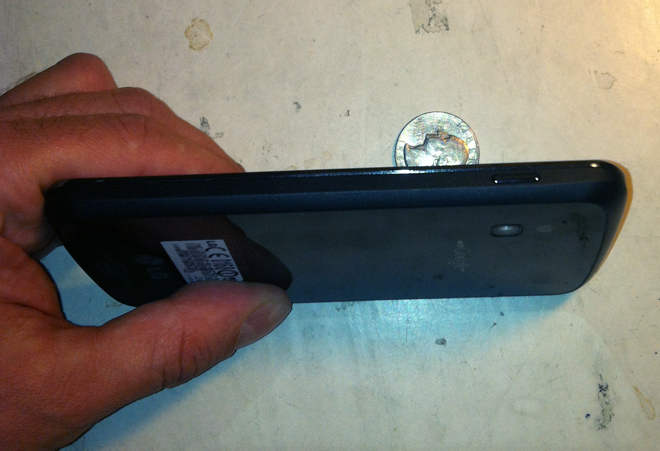
But this particular phone didn’t seem like the others. Nobody came to pick it up and Barton noticed quite a few peculiar features like a lack of SIM card and a “not for sale” sticker accompanying a Google logo on the rear panel. Once he showed it to fellow 500 Club employee, Dave, it was confirmed to be the upcoming Nexus 4.

The Nexus 4 is the smartphone Google was planning to unveil in New York on October 29, but that event has since been cancelled due to Hurricane Sandy. And, we might add, every detail about the Nexus 4 has already been leaked, including photos of the device. It will be manufactured by LG and have a 4.7 inch display, a quad-core processor, and ship with Android 4.2. If it was meant to be a secret then Google clearly dropped the ball.

Dave took over from there, offering to call Google HQ and explain what had happened. And much like Apple, Google blew the whole thing out of proportion. Brian Katz, Google’s global investigations and intelligence manager, was sent to the 500 Club almost immediately. Dave assured Google that Barton would hand over the phone as long as whoever picked it up confirmed their affiliation with Google.

Long story short, after some drama involving a riot and the local police station, Dave handed the phone over to Katz. In exchange, Katz offered Barton a free phone if he would agree to keep the incident under wraps and not discuss it with the pubic until after the official announcement. Obviously, Barton refused the offer and was paid a freelance fee by Wired for providing photos published alongside the article. Looks like isn’t the only one that’s lost control of its secrets. 


Source : digitaltrends[dot]com

Jetsetter: FIFA players vie for Scottish soccer team manager’s job

In Jetsetter for the week ending Oct. 27, FIFA players jockey to become replace the Dunbarton Sons football team manager spot in Scotland, Italy's first video game museum opens in Rome, and Indiagames loses its chief after Disney acquisition.

One would think that thanks to the Internet, memes, trends, and brands would be global experiences all the time. We assume that because “Gangam Style” got huge in Korea, then huge in the United States, that it’s also huge in Estonia. The World Wide Web may extend its tendrils into every inch of the world, but culture is still regional. Video games demonstrate it nicely. Sailor Moon hasn’t been big in Japan or the US since the 1990s, but Italy’s so enamored with the evil fighting schoolgirls that it released a Sailor Moon DS game just last year. That’s why there’s Jetsetter.

Welcome back to Jetsetter, Digital Trends’ weekly column looking at the international world of video games. People in the US like their Madden NFL and Call of Duty. You already know that. But do you know about the German development house still making Neo-Geo games? We’ve got your back.

* 75% of applications for Scottish soccer team manager job are from FIFA players.

It’s kind of like The Last Starfighter, but with hooliganism and football instead of aliens! The Dumbarton Sons, a Scottish soccer team, recently fired its manager Alan Adamson. Sons chief exectuive Gilbert Lawrie told The Daily Mail that many people have already applied for the job, but the majority of them only have management experience in EA’s hugely popular FIFA games. “I can tell you I’ve had dozens and dozens of applications and it takes a while to sift through the CVs of people who have won the Champions League on FIFA 12. Probably 75 percent of the applications so far are from people who taken a team from a low ebb to great heights on a computer screen, which is a great achievement for them but perhaps not what we are looking for at this time.” Back to Xbox Live with the lot of you!

* Video game museum opens in Italy.

When in Rome, do as the Romans do and celebrate video game history by visiting Vigamus, Italy’s newest gaming museum. The museum opened for business just one week ago on Oct. 20. “We have problems here recognizing the cultural and artistic value of games,” Vigamus director Marco Accordi Rackards told Edge, “In Italy we don’t have a very solid industry, as developers; we have a strong market, but that doesn’t help very much because people think of video games just as toys—something you buy, sell, promote, not a cultural industry where you create. We want to push the cultural value of video games, to educate those familiar with games and those who aren’t.”


* Managing Director of Disney India’s interactive division resigns.

Disney’s been bulking up its video game development in India, acquiring Indiagames and its shareholder UTV back in March. While Disney brought many of the developers and executives at those companies into the newly formed Disney UTV Digital, an exodus of employees are is starting within the company. Medianama reported this week that Disney UTV managing director Samir Bangara, one of the chief architects of Indiagames, has resigned. More are expected to follow his lead. For anyone in the west unfamiliar, Indiagames is that nation’s equivalent of Ubisoft subsidiary Gameloft, pumping out a number of popular iPhone and iPad titles like its series Cricket Fever.


Source : digitaltrends[dot]com

It's free
index