You might not be getting Windows Phone 8 on your old handset but the consolation prize is Windows Phone 7.8, and it looks set to land just after the new OS goes on sale.
According to a post on Facebook, we'll see Windows Phone 7.8 land shortly after Windows Phone 8 devices go on sale in November – which jives nicely with the information a Chinese blog came up with yesterday.
It also lists just a couple of upgrades you can expect to see, including a "new Start screen", which we've already seen is more in line with Windows Phone 8.
It was the Italian Windows Phone team that posted the new slivers of information to their official Facebook page, although it's since been taken down.
Screengrab
Happily, Plaffo.com managed to save a screengrab before it was removed, which, when translated, reads:
"'The upgrade to 7.8 will be available for versions 7.0 and 7.5 shortly after the marketing of the devices Windows Phone 8.
"Among the features there is the new Start screen, the sharing of the calendar using the function Club and access to key services and content Microsoft, including Xbox Music Store library that can be enjoyed by Zune and Xbox SmartGlass."
As with most software upgrades, exactly when existing Windows Phone 7 devices will get the update will depend as much on your network as what manufacturer made your device.
Still, we'd expect to see the roll-outs starting from the end of November, but we'll endeavour to find out more and keep you posted.
The rise of digital goods and software-reliant gadgets has thrown a wrench in the contemporary concept of ownership. Here are eight products that, even though you paid for them, aren't entirely yours.
This week, the U.S. Supreme Court heard arguments in a case called Kirtsaeng v. Wiley, which will test the limits of something called the “first sale” doctrine. First sale is the legal doctrine that governs our right to buy, sell, and loan things like CDs, books, DVDs, and any other product that is covered by copyright without first having to obtain permission from the product’s copyright holder.
If the Supreme Court sides with textbook publisher John Wiley and Sons, which sued Thai-born student Supap Kirtsaeng on copyright infringement grounds for buying the publishers books in Thailand and selling them to U.S. college students at a profit, you may no longer be able to freely buy or resell used, copyrighted goods. It could even put a stake through the heart of companies like eBay, Amazon, and Craigslist, all of which deal heavily in the sale of used goods.
Regardless of the outcome of Kirtsaeng v. Wiley, a decision for which is expected in June, there appears to be broad confusion among consumers about what “ownership” really means these days. So, in the spirit of clearing things up, here is a quick rundown of the products that, even though you paid for them, aren’t entirely yours.
Smartphones
While it’s currently legal to buy or sell a used smartphone, the law says you may not necessarily do whatever you like with the device. According to the most recent round of exemptions to the Digital Millennium Copyright Act (DMCA) from the Library of Congress, smartphone owners will soon no longer be allowed to unlock their devices for use overseas or with another wireless provider, unless their current carriers give them permission to do so.
Tablets
Unlike smartphones, which may be jailbroken for the purposes of installing apps not approved by the respective app marketplace, tablets are not exempt, according to the new DMCA rules. The reason being: Jailbreaking requires making changes to the device’s firmware, which is currently a copyright violation, at least when tablets are involved. So, why is it allowed for smartphones and not tablets? Two reasons: First, the U.S. government says the definition of a tablet is still too broad to write in an exemption for devices that fall under that name. Second, because tablets are less widely adopted than smartphones, copyright holders were able to convince the government that adding an exemption for tablet jailbreaking would adversely affect the devices.
In short, if you have an iPad, you’re only allowed to install apps from the iTunes App Store. Try to jailbreak it, and you’ve broken the law.
Kindle e-books
If you think you just bought that Kindle e-book, you’d be wrong. You licensed it – a concept everyone needs to be familiar with these days. Amazon’s Kindle Terms explicitly state that “Kindle Content is licensed, not sold,” and that, “you may not sell, rent, lease, distribute, broadcast, sublicense, or otherwise assign any rights to the Kindle Content or any portion of it to any third party.”
The control Amazon has over your Kindle e-book collection came under intense public scrutiny last week after a woman named “Linn” alleged that the company had shutdown her Amazon account and deleted the entire contents of her Kindle e-reader due to some suspicious activity linked to her account. Amazon later stated that “account status should not affect any customer’s ability to access their library.” But Linn is not the only one who has experienced similar loss of access.
Music
Just like e-books, “purchasing” a song on, say, iTunes does not mean you’ve bought the song itself. Instead, you’ve paid for the right to play that song in your personal life (provided your “personal life” doesn’t involve playing songs for large groups of people). Furthermore, it is – believe it or not – against the law to burn a copy of a song you “purchased” onto a CD, or to give a licensed MP3 file to a friend.
In terms of being able to resell music you’ve paid for, things are even more complicated. A company called ReDigi is currently being sued by Capitol Records for giving users the ability to resell their MP3 files, just as used record stores sold, well, used records. This, despite the fact that ReDigi’s technology automatically deletes the seller’s copy of a song or album when it goes up for sale. And no copies of a track are made — the actual file is transferred from one machine to the other, which the company says is a perfectly legitimate way to resell music. Capitol, of course, disagrees.
Movies and TV shows
Movies fall into the same category as music and e-books. As such, making copies of a DVD, or ripping a DVD so you can watch it on a device that does not have an optical drive, are violations of copyright. Now, if you’re copying DVDs on a small scale, just giving a copy to a friend or relative, then there is little chance that you’ll get served with a lawsuit from the MPAA. But not getting caught and being allowed to do something are, as you likely realized by now, two entirely different things.
Oh, and if you’re wondering, the whole “licensed, not sold” thing goes for digital movies purchased through Amazon, iTunes, and other online digital movie marketplaces, too.
Video game consoles
As with tablets, it is perfectly legal (for now) to resell your used Xbox or PS3. What you may not do is mod your video game console (or handheld gaming device) to run an alternative operating system due to copyright on the device’s firmware. Furthermore, jailbreaking your Xbox (or other console) is also forbidden because, according to the Library of Congress, “video games are far more difficult and complex to produce than smartphone applications” and anti-jailbreaking mechanisms are in place to “protect highly valuable expressive works.”
Apps
Don’t even think about trying to give away or resell any of your mobile apps. Not only is this technically difficult, both Google Play and Apple’s iTunes App Store – the two largest online mobile app marketplaces – firmly forbid the reselling of your apps. According to the Google Play terms of service, customers are not allowed to “copy, sell, license, distribute, transfer, modify, adapt, translate, prepare derivative works from, decompile, reverse engineer, disassemble or otherwise attempt to derive source code from” purchased apps. And Apple goes even further, saying that customers may not “rent, lease, lend, sell, transfer redistribute, or sublicense the Licensed Application,” and must “remove the Licensed Application from the Mac Computer or iOS Device” before reselling the device.
Pre-loaded devices
Which brings us to our final item: Pre-loaded devices. Because of the copyright rules governing e-books, movies, e-books, apps and other software, selling a device that already contains these copyrighted items means you would likely be in violation of intellectual property law were you to do so. So if you were thinking about offloading your old iPod with 40,000 songs already on it to your mom’s best friend, just make sure the RIAA doesn’t catch wind of your little scheme, or you could be in hot legal water.
When it comes to the world of Bluetooth headsets, one of the most trusted names in the industry is Plantronics. And now you can get one of their better Bluetooth headsets for quite the impressive price.
You see, the Plantronics Voyager Pro HD normally retails for $99.99, but that price has been slashed by $40 down to just $59.99. In signature Plantronics style, the Voyager Pro HD has a slightly longer boom microphone than what you may find on some competing devices. This means that the clarity of your voice should be improved, as the mic is closer to your mouth. The headset also boasts “brilliant, HD streaming audio.”
Since the headset is going to be on the side of your head, you might not notice that it’s running out of battery. The cool thing is that Plantronics has an app for iOS and Android that lets you remotely monitor the battery on your headset. Speaking of battery, you should get up to 6 hours of talk time and up to 120 hours of standby. It’s also nice how it can “sense” when you’re wearing it.
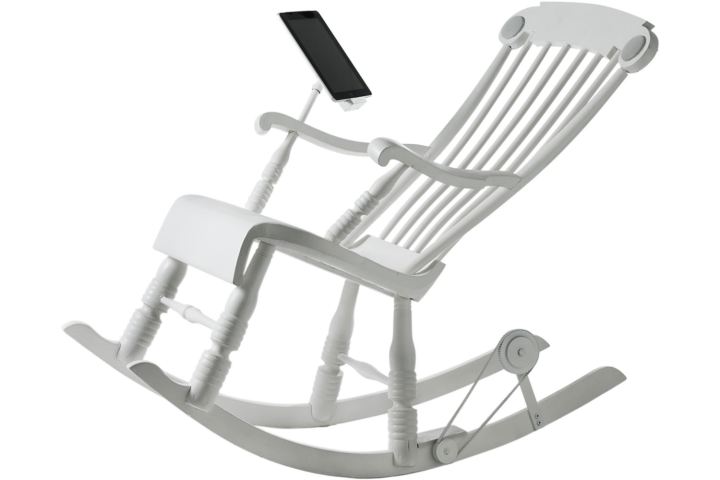
Motion-powered generators are becoming a trend in tech-infused clothing, furniture, and accessories ... but none have targeted an older audience quite like this iRock rocking chair.
Who says technology is only made for the new generation? While my grandmother may not be cool enough to answer emails and text messages, she does know how to work an iPad. So if you’re visiting sweet old grams and realize your tablet is low on battery, just ask her to hang out in her rocking chair to generate extra juice in that iPad.
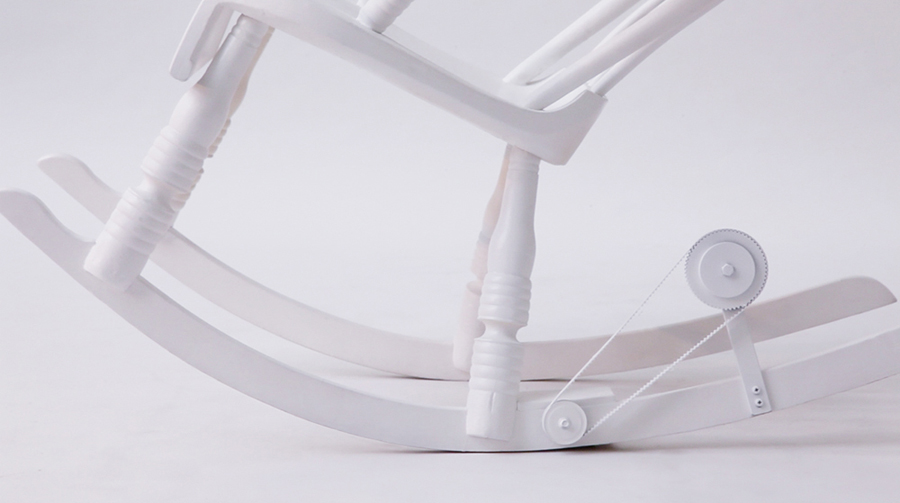
Yep, you really can play out that scenario. The iRock chair is built to not only dock an iPad or iPhone for your viewing pleasure, it will also generate battery power as the chair swings back and forth. Built-in 25-watt speakers align the sides of the headrest so grandma to rock out to her classic jams. And yes, adapters for the iPhone 5 Lightning connector will be included if you’re that caught up on the latest gadgets on the market.
“The iRock is an product that explores how furniture can interact with technology and actually support the power for this technology,” the iRock product page reads. “If you use iRock for 60 minutes you can recharge an iPad 3 to 35%.”
Not sure how fast granny would have to swing to get such power back onto your mobile devices, but any charge at all is better than leaving the tablet out to drain. Micasa Lab, the creator of the iRock, says Android compatibility is not yet available but it is something the company aims to add in the near future. Theoretically, one would only need to buy the chair along with various adapters to fit whichever mobile device you want to rock and charge.
The iRock is crafted with Swedish pine wood and will be available in five color options: Black, White, Pink, Green, and Blue. How much will you have to spend for some technological porch accessory? The iRock is available now for a pretty price of €1,300 (or approximately US$1,680), with an estimated shipment date of late 2013. But for a happy grandma, perhaps that sticker tag is priceless.
Ice Cream Sandwich used to be the new kid on the block, but it's been usurped by the likes of Android 4.2: Jelly Bean as the OS to have on the likes of the Samsung Galaxy S3 and Google Nexus 4.
However, loads of users are still waiting for their Ice Cream Sandwich update, and Google told us that this is one of the biggest overhauls of the operating systems since it unleashed the Android project three years ago - and there's certainly a lot to plough through.
From enhanced contact menus to improved keyboards and NFC capabilities, even the most ardent Android users will have to spend some time getting used to the new OS if they've never been Android 4 - so let's dive in.
Interface
The most noticeable change with Ice Cream Sandwich is the interface - it might follow the same principles as the Android of old, but the way it's used is radically different in a number of ways.
Firstly, Android 4.0 is designed to work without buttons. However, it's clear that notion has died, as physical buttons are still everywhere over a year on... so don't worry if you're a fan of a good home button.
Now to navigate around, you're offered three softkeys: Back, Home and Multi-tasking (or Recent Apps). The latter is particularly new for phones, and comes from the Honeycomb UI - basically a set of thumbnails that show recently opened apps.
Here's the new part: swipe sideways to shut down an application, which will greatly help reduce the battery consumption of your phone if there's something silently updating in the background.
The Home and Back buttons are the same as they've always been, but no longer have a 'long press' function attached... so you can't automatically call up the keyboard, for instance.
If you move into something media-ish, such as watching a movie or browsing the web like a pro, these three buttons shrink down to tiny dots, so you've got more of the screen to look at. However, remember what each dot does, as pressing it will take you home/open the recent apps etc and you might not want to.
For Android fans, this presents something of an issue: with the menu button gone, you'll have to hunt around the screen for three vertical dots which have taken its place. However, these can be anywhere, so sometimes you'll get distracted trying to work out how on earth to alter settings.
The multi-tasking pane also seems an odd choice for one of three buttons - it used to be you could access this functionality by long-pressing the home key, and it makes more sense to keep this and then have the multi-tasking slot taken up by a menu key.
However, despite the odd placement, the multi-tasking pane is cool - simply swipe horizontally on any open app to shut it down, in a similar way to the Cards system on webOS - it certainly helps keep open applications under control.
The home screens are once again limited to five, but this time there's no option to get rid of those you don't want. It's not a huge issue to some people, but with the expandable widgets and loads of apps you'll be looking to download, we'd have expected more.
This isn't the case with most other phones, which will extend it to at least seven screen, but Google likes to be stingy.
There's a plethora of tiny tweaks and changes to the Android OS that we were impressed with, ranging from the Tron-like blue theme that pervades throughout the OS to the ability to unlock the phone simply by using your face.
The latter security option is more novelty than anything else, with Google outlining at the start that it's not meant to be 100% secure.
We also found a few issues with getting it to recognise our face in varying light levels, or even working out which bit of the picture was a face - not the most effective for unlocking your handset, but when it works it's a great party trick.
This has been updated in Android Jelly Bean to include blink detection, but you sadly won't have this option if you're stuck on Ice Cream Sandwich.
The notifications bar has been given a functionality overhaul to now include larger information slots - if it's a contact that's sending you a message or a missed call, their contact photo will now appear too, which is a nice touch.
And sometimes you want to get rid of some notifications, but not others - this has been taken care of by allowing you to swipe away the updates about apps and messages you don't care about, making it easy to maintain your info bar.
Settings has also been given a spot in the notifications pane, meaning no matter where you are in the OS you can always duck out and tinker with the phone - this is excellent news for some applications that need GPS or Wi-Fi enabled swiftly.
However, we would have though Google would have copied the likes of Samsung here and offered one-tap switching to these elements - it works really well on most phones, so we're surprised by its omission.
The other new addition is the dock at the bottom of the screen - this stays on every home screen, and like iOS can be altered to contain the applications you like to tap away at the most.
Folders are more iOS-like too, with users given the ability to drag and drop icons on top of one another from the home screen to create bundles of apps which you can simply rename. Given Apple's ire about Google 'stealing' certain elements of its UI, we can't help but think this created a little more angst down on Infinite Loop.
Google is clearly also thinking about giving users more ability to enjoy apps than ever before by putting a link to the Market in the top right hand corner of the menu screen, which we really liked as it meant we always knew we could quickly update our app catalogue when needed.
The other big change is widgets have been brought to the fore: you can now look at each one on the menu screen without having to actually select it - this really helps when a new application you've downloaded has an associated widget and you're wondering whether to waste time popping it on the home screen.
Overall, we love what Google has done with the Ice Cream Sandwich UI. It's nothing mind-blowing, but the little touches here and there will add to user delight, and that's what's needed to chip away at those that are dyed-in-the-wool iPhone users.