Computer insurance: Should you buy it?

Computer insurance Should you buy it

What is computer insurance and is spending the extra cash worth it? Here’s a handy guide to help put things in perspective.

Computer insurance is meant to protect your machine against malfunction, accidents, and (if you’re lucky), theft. Whether it’s in the form of a private insurance policy or a simple warranty, there are many choices to make when deciding whether or not you need to insure your laptop or desktop.

According to Consumer Reports, about one in three laptops and desktops break by their fourth year. Considering most manufacturer’s warranties last about a year, that leaves you with about three years of time when your computer could either sail ahead, problem-free, or be bogged down by hardware issues requiring maintenance.

But should you buy an extended warranty? To try and answer that question, we spoke with Adam Senderson, manager at Computer Overhauls in New York City, who thinks that generally speaking, buyers should purchase a warranty right from the start. However, if you’re buying a lower-end laptop, a warranty may not be worth it since you can just buy another $300 laptop a year or two from then. “If it’s a computer that costs over $750, you should definitely be getting the warranty,” Senderson said. “If it’s less, it’s more of a judgment call.”

Navigating the land of warranties can be difficult. To help you find your way and make the right choice, we’ve taken a look at manufacturer warranties, extended warranties, private insurance, homeowner’s insurance, and detailed what you need to look out for when choosing whether or not to buy insurance for your computer.

Manufacturer’s Warranty

Most products come with at least a one-year manufacturer’s warranty. If they don’t, you’re most likely getting a cheap laptop that will develop problems within the 90-day warranty offered at purchase. The manufacturer’s warranty typically covers most minor malfunctions, hardware support for any defects in the laptop’s material, tech support, mail-in repair service, and the option to return and replace a machine that you receive dead on arrival. Most basic warranty programs are good for replacing malfunctioning hardware, such as a hard drive or keyboard, but will not take responsibility for defects you caused or accidents that are unrelated to the manufacturer’s design and craftsmanship.

You don’t have to make a choice here; this kind of coverage should just come with the product.

Extended Warranty

According to Senderson, the most common repairs he sees are broken screens and liquid damage. In terms of software, “virus infection is quite substantial,” he said.

Generally speaking, Senderson said most PC laptop screen replacements and labor cost can run between $200 and $300, depending on the computer. Did you spill your coffee on your laptop during when you sat down at your desk? Senderson said liquid damage can be fixed for about $150 to $250 – that is, if the motherboard doesn’t need to be replaced.”

When buying a new computer, you’ll be offered the opportunity to buy an extended warranty. This happens 99.9 percent of the time, so be prepared. “You definitely want to find out what the warranty covers,” Senderson said. “Some cover wear and tear, and some cover accidental damage, which is a huge difference.” Before you go to the Apple Store, Best Buy, or Staples, do your research beforehand to see what these extended warranties cover and how much extra it’ll tack onto your bill.

Best Buy: Distributors such as Best Buy and Staples offer their own versions of extended warranties. Best Buy’s Geek Squad has two renewable options: tech support insurance lasting two years for $100; and Geek Squad Protection for two years for $180 (or $100 for one year). The latter includes tech support and accident coverage, as well as a one-time replacement for your battery and charger. Tech support covers virus removal, problems with your operating system, and labor that doesn’t involve physical parts. To gauge whether these insurance options are worth the money, consider this: a virus removal alone without the Geek Squad’s tech support insurance will cost $200.

Staples: Staples offers a renewable two-year Care Protection Plan based on your computer’s retail price. The basic plan, which lacks accident coverage, takes care of backup, virus removal, and hardware failure. The full plan includes the repair or replacement of your computer (whichever is cheaper) in case of physical damage, such as a cracked screen or faulty keys. Coverage ranges from $90 to $170, depending on the price of your computer. Considering virus removal at Staples without insurance, will cost you $160, it may be worth the investment.

By the way, none of these insurance options will help in case of loss or theft.

Apple: The AppleCare protection plan will extend a three-month warranty to three years. Since the least expensive laptop at Apple will cost you right around $1,000, the extra $250 is a small price to pay for hardware coverage and support.

Also of note, some major credit card companies will actually extend your device’s warranty up to an additional year for free if you charge the purchase with their card.

Renters or homeowners insurance

If your limit is high enough, you may be able to insure your computer equipment under your personal property coverage. This insurance may cover the policyholder’s equipment in case of certain damage or loss due to fire, flooding, and power surge. In this case, you should check whether your insurance will cover your computer even if it isn’t at home when it is damaged or lost, because the insurance policy may compensate you only if your computer is stolen from your home and not at a coffee shop or an airport, for example. You will often need to explicitly ask to adjust your policy so that it covers loss and damage outside of your home as well, as the policy will probably not offer this option automatically.

Standalone insurance

If you don’t have renters or homeowners insurance and aren’t interested in either, many insurance companies offer standalone insurance on specific valuables. For a yearly fee, plus a deductible, you can get insurance on your laptop to protect against theft, and any accidental damage like drops and spills. Many policies also cover flood, fire, or power surge damage.

Things to look out for

According to the Federal Trade Commission, consumers shopping for warranties should always get them in writing – talking to a representative over the phone is definitely not enough. The FTC also recommends considering the warranty’s length; make sure to understand what the warranty vows to cover, whether it commits to repairing your computer, replacing it, or giving you a refund, and what parts and repair problems the warranty applies toward. Also, be sure you know who to contact if service is needed, and whether it covers damages caused by the product itself to other products.

Needless to say, if you buy a warranty, always save your receipts in a place you’ll remember, because the company offering it to you may ask for it before service or reimbursement.

So, is insurance worth the money?

You may not like this answer, but it’s really your call on whether you buy the warranty or insurance. If you had to take out a loan to buy your new MacBook Pro, chances are you don’t have the money for repairs. In that case, the three-year Apple Care protection plan would probably be worth it. If you bought a $400 laptop during a Black Friday sale, it’s up to you, and depends on the cost. You may end up buying the warranty and never using it, but if you’re the type of person who’ll be afraid to bring your laptop out of the house in fear that it’ll get damaged or stolen, then for your peace of mind, insurance may be worth it.

However, since most computer problems are due to malware or hard drive problems, you can try your best to prepare your computer for the worst by installing antivirus software and backing up all your files to a cloud service. Either way, it’s a gamble.

Will you be splurging on computer insurance next time you make a big purchase, or will you risk it?

[Image courtesy of RAStudio/Shutterstock]


Source : digitaltrends[dot]com

Firefox 64-bit development quietly ended for Windows

It appears Mozilla has quietly toe-tagged 64-bit builds of its Firefox browser for Windows. In a Google Groups discussion, managing engineer Benjamin Smedberg requested coders halt development on nightly builds of its 64-bit Windows distribution.

Mozilla's reasons to end 64-bit flavors of Firefox are numerous: limited plug-in availability, more frequent hang-ups and performance issues, stability problems due in part to a niche user/developer base, difficulty distinguishing between 32-bit and 64-bit bug reports and a general feeling that 64-bit users are second-class.

There was a five-day lapse between the question's proposal and the subsequent confirmation which affirmed the demise of Firefox's more futuristic alter ego. During this time, thread participants issued a number of mixed replies both for and against the decision.

One user said, "I agree whole-heartedly about switching off Win64 Nightly builds - crash-stats are just the tip of the iceberg.", linking to this discussion which spells out some of the troubles developers and users have been experiencing with x64 builds. Another user suggested, "How about you fix the problems instead?" -- the assumption being if Mozilla focused on 64-bit development, those supposed issues would no longer be a reason for the organization to eviscerate the project.

Since Smedberg's proposal specifically called out Firefox builds for Windows, 64-bit development appears to be safe for other platforms, like Linux -- for now. If it were to be canned for Linux users though, a x64 build of Chromium seems like the best alternative for 64-bit purists.

It's interesting to note that although Firefox alternatives like Internet Explorer and Opera offer 64-bit browsers, Google Chrome remains exclusively 32-bit for Windows. By virtue of being 32-bit, Firefox is limited to 2GB of memory usage -- one of the benefits to being 64-bit is access to more physical RAM. Unlike Mozilla's browser, Chrome runs each tab as its own process. This trick allows Chrome to gracefully surpass the 2GB limit without having to be 64-bit.


Source : techspot[dot]com

Why Apple stores are raking in bags full of cash, and no one can dupe the formula

Apple retail store profits

Apple's stores are leading the retail industry in revenue per square foot, and none of its competitors seem to be able to crack the code.

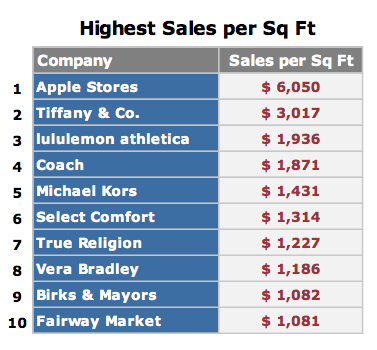
Apple’s retail stores are practically holy sites to company’s legions of dedicated fans,  but as it turns out, they’re also the envy of the retail world. According to the latest figures from RetailSails, Apple’s stores lead the retail industry in terms of the money they generate per square foot. And for the first time, Apple is in the top 10 for highest overall sales per store.

Just how is Apple able to perform so much better than other consumer electronics retailers and world-renowned brands? And more important, why haven’t any of them been able to duplicate Apple’s magic formula yet?

Diamonds are for suckers

RetailSails sales per square foot 2012

According to RetailSails (PDF), Apple Stores generate more revenue per square foot than stores operated by high-end jewelry retailer Tiffany & Company. That would be impressive in its own right – Tiffany & Co. is the leading retail diamond merchant and came in number two in RetailSails’ metrics. But Apple didn’t just beat Tiffany, it trounced the poor jeweler: RetailSails estimates Apple stores pulled in $6,050 per square foot, compared to $3,017 per square foot for Tiffany & Co. Other retailers didn’t even come close. Number three was lululemon athletica, whose stores generated an estimated $1,936 per square foot. Coach and Michael Kors rounded out the top five with $1,871 and $1,431 per square foot, respectively.

“Apple obviously stands out from the crowd, with sales per square foot double that of the number-two chain and more than six times the figure for Best Buy,” said RetailSails founder Josh Ramer, via email. “By combining premium products and revolutionary retail stores, Apple has not only built the most valuable brand in the world, but also an environment that drives shoppers into its stores – 94 million store visitors in just the latest quarter alone, or 19,000 per store per week.”

Adding insult to injury, Apple’s figures are increasing: In 2011, RetailSails estimated Apple’s store revenue at $5,647 per square foot – up seven percent in the last year. And this in a year that marked considerable tumult for Apple’s retail efforts, with the hiring and firing of John Browett as the head of retail operations.

As a rough gauge of success, sales of about $300 per square foot are considered about average for general retailers in the United States by organizations like the International Council of Shopping Centers – jewelers and specialty apparel retailers generally have higher averages. By that measure, one could argue Apple stores are doing twenty times better than the typical shopping mall retailer.

RetailSails sales per store 2012

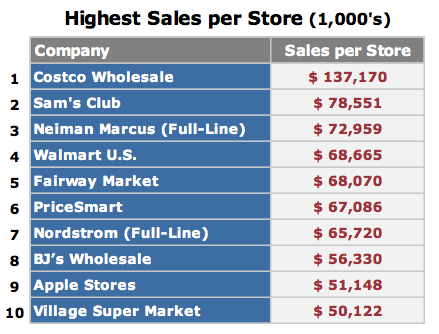
Apple’s retail success doesn’t end there. For the first time, Apple stores have cracked the top ten for highest sales per store, coming in at number nine with an estimated $51,148,000 earned per location in 2012. That’s still far behind the leader, membership warehouse chain Costco, which RetailSails estimates will pull in $137,170,000 per warehouse in 2012. But Apple is the only consumer electronics retailer in the top ten: The rest are warehouse stores (Sam’s Club, Walmart, Pricemart, BJ’s Wholesale), high-end retailers (Neiman Marcus, Nordstrom) or grocery retailers (Fairway Market, Village Super Market).

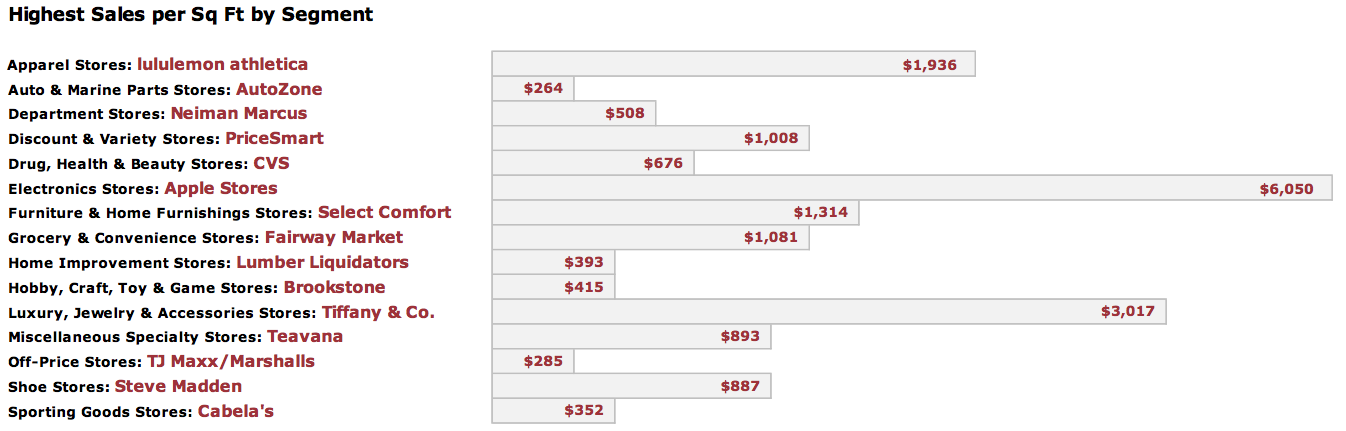
It should be noted that RetailSails’ numbers are estimates. Retailers aren’t in the habit of publishing their per-store sales figures, so RetailSails often has to comb through details in earnings calls and investor presentations, press releases, regulatory filings, and even rely on sales information published by competitors – then they try to strip out online and direct-to-consumer sales, franchise revenue, licensing, and other revenue streams to come up with per-store numbers. The company’s 2012 metrics cover more than 200 chains in 15 different product segments. Although its charts are disproportionate (the Electronics Stores bar should be more than twice as long as Luxury, Jewelry, & Accessories Stores, for instance), it provides an idea how other segments are faring:

RetailSails sales leaders by segment 2012

Apple’s strong points

Why are Apple Stores so successful, particularly when compared to other folks trying to sell consumer electronics?

“In 2001, when Steve Jobs and Ron Johnson first decided to open a store to sell Apple products, they didn’t start with a vision to sell stuff,” said Carmine Gallo, keynote speaker and author of The Apple Experience in a telephone interview. “They decided the vision behind the Apple Store would be to enrich lives.”

That approach is borne through in the steps of service Apple outlines for its store employees:

  • Approach customers with a personalized, warm welcome
  • Probe politely to understand all the customer’s needs
  • Present a solution for the customer to take home today
  • Listen for and resolve any issues or concerns
  • End with a fond farewell and an invitation to return

It’s easy to notice the clever little acronym, but it’s more important to see what word isn’t mentioned: sell. Apple emphasizes the experience of visiting an Apple store, using Apple products, and letting users see how those products fit into their lives rather than focusing on making as many sales as possible. To that end, Apple store employees are hired more for their personalities than their sales or technical backgrounds, and – unlike many other retailers – they’re not paid on commission. If a staff member at a typical retailer spends an hour with a customer but doesn’t make a sale, that employee will probably get reprimanded. At an Apple store, all that matters is that the customer had a good experience.

It also means Apple store employees focus on products that meet a customers’ needs, rather than pushing items that will ring up the largest sale. Customers ogling a $2,000 iMac might find themselves steered towards a less-expensive model if it’s a better fit; similarly, customers looking at an iPhone or iPad are likely to find Apple employees showing them how the devices can meet their needs rather than scripted selling points. And beyond an initial hello, Apple employees are also willing to let customers try stuff out on their own and make the first move.

Copying Apple isn’t easy

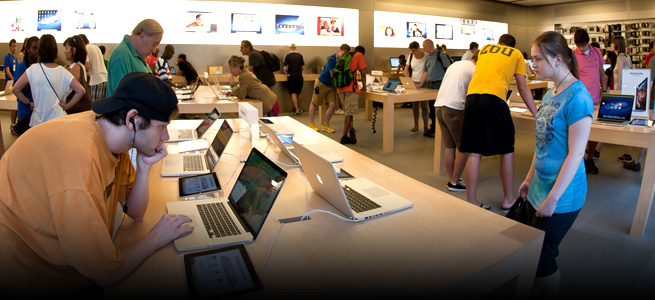
Apple Store Grand Central Station Store 2

All these things help explain why customers like Apple stores – others include the Genius Bar, Apple’s One-on-One training sessions, and scan-and-go purchasing with the Apple Store App. But do they explain why Apple stores are so profitable per square foot? Given that Apple stores have been around since 2001, why haven’t other retailers been able to copy the experience and try to beat Apple at its own game?

There are a few other factors to consider:

Few products

A typical Apple store carries hundreds of individual products, from iPhones, iPads, and Macs to headphones, software, and accessories. But the selection is very small compared to consumer electronics retailers, let alone mass-market retailers, whose stores often feature thousands or tens of thousands of individual items. Apple’s tightly-focused product line also enables it to focus its retail experience in ways more generalized retailers can’t match.

No wasted space

If you have a one square-foot store and a million-dollar product, you only need sell one item a year to utterly dominate the RetailSails survey. Apple’s retail stores aren’t exactly diminutive: Two of Apple’s London stores are in the 25,000 square-foot range, and Apple’s recently-opened store in Grand Central Station is about 23,000 square feet – all large by modern retail standards. However, many of Apple’s retail stores are comparatively modest in size, occupying more-or-less ordinary (if high-rent) spots in shopping centers. As of August 2012, Apple had 394 retail locations worldwide; according to Apple, 240 of those are in the United States. Compare that to struggling big-box consumer electronics retailer Best Buy, which has more than 1,100 stores in the United States (omitting several hundred Best Buy Mobile outlets). Comparing the scale of Apple’s retail efforts to Best Buy really is a case of apples and oranges, but some of Apple’s astonishing revenue-per-square-foot is due to Apple operating comparatively few square feet.

Less baggage

When Apple opened its first retail stores in 2001, its main product was the Macintosh — even the iPod just barely existed. The Mac had never dominated the PC industry, and Apple’s presence in big-box retailers like CompUSA and Circuit City were generally failed to show Macs in a good light, or even show them working at all. Part of Apple’s intention with opening its own retail stores was to control the presentation of its products and give a positive experience to customers. It had the advantage of starting from scratch; even if customers were familiar with the Macintosh or other Apple products, none of them had previous experience with an Apple retail store. That’s not true of any retailer hoping to copy elements of Apple’s retail formula: Even if they successfully change their existing retail experiences to be something more akin to Apple, it will take some time before customers forgive or forget the echoes of their previous efforts.

The X factor

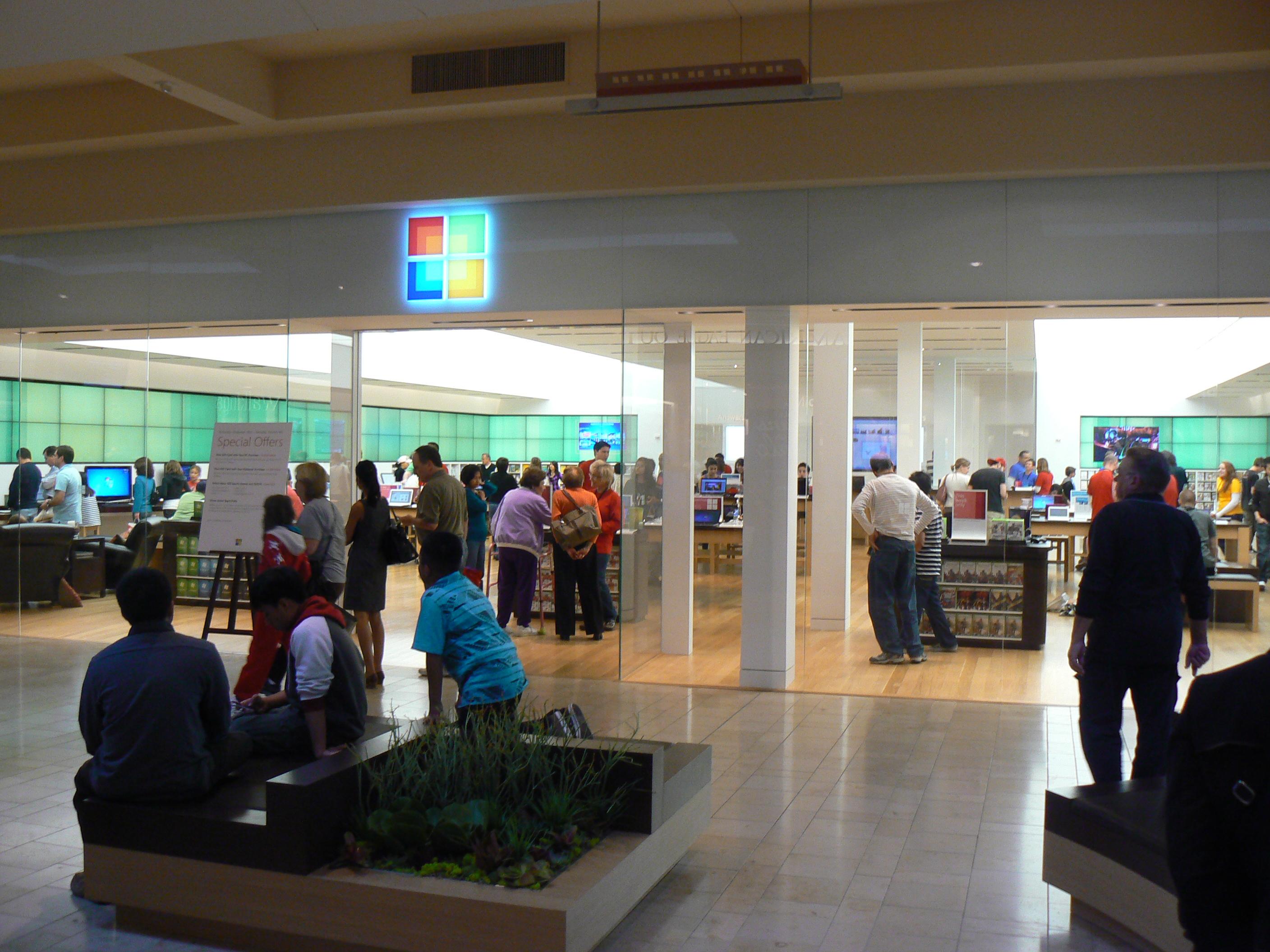
If there’s one company that has directly tried to challenge Apple’s retail strategy, it’s Microsoft, which has opened its own stores in Apple’s image. And in some cases, in the literal shadow of Apple stores.

Since I happen to live in the vicinity of one of these rare Microsoft stores, I recently wandered in to get some first-hand experience and see how they stack up beside Apple’s own.

Microsoft store

Microsoft’s store location is only a few yards from an Apple store, and conspicuously larger, but otherwise the resemblance is startling, down to blue-shirted employees. But it felt vacant, with idle employees and a handful of kids playing with an Xbox Kinect setup. An employee greeted me after I entered, and I said I was curious about the typing experience on the Microsoft Surface. Big smile; the employee enthusiastically led me to one and then proceeded to use it for me, pointing out key elements of Windows RT without letting me touch the device, ask questions, or politely get a word in edgewise. It was a few minutes before we got through the apparently scripted introduction, and I was able to ask if I could test out both the Touch Cover and the Type Cover. The answer was yes, but it was still more than a minute before I actually got to touch a Surface unit. I was able to give the Surface a decent test drive, and I did encounter the slow typing problem in Microsoft Office so many others have written about (but Brent Ozar has a fun video). The Microsoft store employee was witty and answered my questions accurately, but only seemed prepared to ask me if I was already using a tablet.

After I’d finished, I walked down the the Apple Store braced for the worst, because I’ve always found this particular location be overcrowded and noisy. It was. Nonetheless, I was “greeted” immediately, although it was more of a “Hi!,” a nod, and an overwhelmed laugh as the store employee helped a child pick up a dropped toy. Once that was accomplished, I said I was curious about the typing experience on the new iPad mini. “Here, try it!” the greeter said … and just like that handed me an iPad mini. I was less than three feet inside the store, and I’d been there less than 10 seconds. A couple minutes later (child and parent successfully reunited), the employee swung back around, asked what sort of writing I did, if I’d found Pages (Apple’s word processor app for iOS), or if there were particular apps I wanted to try out. I was still barely inside the store.

It turned out my big calloused fingertips didn’t like the iPad mini typing experience any more than being able to out-type the Microsoft Surface. But I know which store made me jump through hoops, and which immediately put the product I’d come to see in my hands.

“What’s easy is mirroring the look of an Apple Store,” said Gallo. “What’s harder is to hire, train, and motivate employees for a transformational customer experience. I hope other retailers improve based on what they’re learning from Apple, but it’s really hard to get the people part right.”


Source : digitaltrends[dot]com

LG confesses reason behind Nexus 4 4G snub

LG confesses reason behind Nexus 4 4G snub

But I want to go FASTER!

The redundant 4G chip in the Nexus 4 caused confusion, but now LG has told TechRadar why it's there.

The presence of the LTE connectivity hardware in the Nexus 4 caused some to believe that it could be next-gen speed-enabled in the future.

"In order to provide the best possible specification for Nexus 4, LG utilised the same powerful Qualcomm Snapdragon chipset as can be found in its 4G LTE product namely LG Optimus G," a spokesperson told us.

"This powerful chipset is only available with a combined processor and modem and cannot be implemented separately.

"The modem contains 4G LTE capabilities but is only effective when combined with other essential hardware parts such as a signal amplifier and filter in order for it to work. It therefore cannot be upgraded to 4G LTE capability through software.

That's why it's cheaper

This will disappoint a number of fans who hoped for a firmware update to give them access to super speed. But the lower number of components means the phone can be brought to the market at an improved cost, despite LG selling for more in other territories:

"With the inclusion of the Qualcomm Snapdragon chipset, Nexus 4 therefore offers the same amazing processing performance as LG Optimus G but for the 3G market," added the spokesperson.

However, let's not be too down: who else can see the day in a few months' time where LG or Google announce a 4G-enabled Nexus 4 to keep interest in the handset alive?


Source : techradar[dot]com

70 best free iPhone apps 2012

70 best free iPhone apps 2012

These are the best free apps for your iPhone

There are now hundreds of thousands of apps available for your iPhone, iPod touch and iPad, and, surprisingly, many of the best are free.

The following list showcases our pick of the 70 best free iPhone apps, and includes iPhone applications for social networking, travel, news, photography, productivity and more.

Most of these apps are also suitable for the iPod touch.

If your top free iPhone apps aren't covered, tell us all about them in the comments.

And don't forget to check out our iPhone 5 review.

You can also take a look through the top 10 free iPhone apps with our nifty video.

1. Facebook

The world's biggest social network brings a tightly honed experience to the iPhone and iPod touch, but nonetheless still enables you to access your contacts, feeds and other important information. This sense of focus makes it in many ways superior to using Facebook in a desktop browser.

Facebook

2. PhotoSynth

We did a bit of a double-take on seeing Microsoft's name attached to this, not least given the lack of a price-tag. But PhotoSynth is a really great panorama app; it's user-friendly and fun to use, especially when watching your panoramas take shape while you capture them.

Photosynth

3. RunKeeper

The prospect of Nike+ but better and for free might sound unlikely, but that's what RunKeeper provides. Previously split into 'pro' and 'free' versions, the developer now generously includes all the features in one free app.

That means you can spend no money, yet use your iPhone's GPS capabilities to track your jogging and cycling routes, and examine mapping and details of your pace and calories burned. Activities can be shared online, and treadmill runs and other exercise details can be entered manually.

Runkeeper

If you like this then make sure you read 10 best iPhone and iPad apps for keeping fit and 5 sports headphones for iPhone and iPod touch.

4. Pulse

RSS has a reputation for being a rather dry technology, feeding you dull lists of headlines. Pulse flips RSS on its head, providing streams of feeds that grab your eye with photographs. It's perhaps not for the hardcore RSS crowd, but if you follow a small number of feeds, it's a great choice.

Pulse

5. Dropbox

Plenty of apps exist for transferring content between your computer and your device, but Dropbox is free and easier to use than most of its contemporaries. Dump files you want to sync in a folder on your computer and Dropbox for your device will enable you to access them, download them for offline viewing, and, in many cases, view them.

Dropbox

Love Dropbox? Then check out our article Essential tips for every Dropbox user.

6. National Rail Enquiries

For anyone commuting by train, National Rail Enquiries is a handy app to have installed. There's journey planning, timetables and a location-aware 'next train home' option, along with progress tracking, so you can see when a train's likely to show up. It's not as usable nor as pretty as UK Train Times, but it is broadly similar - and five quid cheaper.

National Rail Enquiries

7. Skype

FaceTime is a great alternative to standard voice calls, but it's no good if you're trying to contact someone without a Mac or compatible iOS device. Therefore, Skype remains an essential download. The interface is simple and usable, enabling anyone with a Skype account to make free calls to other Skype users and cheap calls to anywhere in the world. If you're on Pay and Go, this is particularly handy, but the app also enables iPod touch users to utilise their devices for calls.

Skype

8. Movies by Flixter

Although some aspects of cinema listings app Movies by Flixter are disappointingly US-centric (notably regarding details on upcoming movies and DVDs), it succeeds where it matters. Select a film and the app figures out where you're located, lists nearby cinemas, and displays times your chosen film is showing. Efficiency can be further increased by pinning favourite cinemas to the top of the list.

Movies

9. TonePad

Virtual pianos and guitars are all very well, but purely digital musical toys are more suited to Apple handhelds. TonePad is the best of them, using a grid-based interface that enables you to turn notes on and off and compose pleasing and harmonious loops; your creations can be edited, saved and uploaded to share with other users.

Tonepad

10. Thomson Reuters News Pro

There are many free news apps, but Reuters News Pro offers a breadth of coverage that makes it a winner. Preferences enable you to tailor the app's output to the UK, and the toolbar provides swift access to news, pictures, videos and stock markets coverage.

Reuters

11. Twitter

The official Twitter app might lack some of the features found in the likes of Tweetbot, but it does provide a sleek and simple means of using the service. It also directly mirrors the latest navigational scheme on the Twitter website.

Twitter

Check out 10 best iPhone and iPad Twitter apps for alternative Twitter apps we recommend.

12. Comics

In all honesty, Comics is a little awkward compared to using it on an iPad, but you won't find a better comics experience on an iPhone. The app is free, as are dozens of downloadable comics - and once you run out of those, many more are available to buy. Reading works on a frame-by-frame automated 'zoom' basis, and is surprisingly usable.

Comics

13. Wikipanion

The Wikipedia website works fine on iPhones, but a dedicated app is a better bet. Wikipanion is a freebie which gives you quick access to article sections, in-article search, viewing options, bookmarking, and the ability to tweet about whatever odd fact you've just unearthed. Also, wonderfully, there are no ads.

Wikipanion

14. Evernote

Clients to access the popular Evernote service for storing notes and ideas online are available for so many platforms that we half expect a ZX Spectrum app to be announced tomorrow. On the iPhone, Evernote is efficient and usable, enabling you to rapidly scan your notes and also create new ones.

Evernote

15. Kindle

With iBooks on the iPhone, you might wonder why you should bother with Amazon's Kindle. After all, the app's not as pretty as iBooks, nor is there an integrated store (you buy in Safari and sync purchases to the app). However, Kindle offers a massive selection of books compared to Apple's app and the reading experience is great.

Kindle

16. Around Me

Around Me figures out where you are and lists local stuff - banks, bars, petrol stations and, er, Apple Retail Stores. The app's reliance on Google Maps info means there are gaps, but it's nonetheless handy to have installed when in unfamiliar surroundings, and the 'augmented reality' landscape mode is amusing, if flaky.

Around Me

17. Dictionary.com - Dictionary & Thesaurus

Over two million definitions, synonyms and antonyms are available in the palm of your hand with this free, offline dictionary and thesaurus. The app is fast and efficient, includes phonetic and audio pronunciation of words, and its interface seems perfectly suited to the iPhone.

Dictionary

18. Air Video Free

Air Video Free can stream (and convert as necessary) video from any computer running the free Air Video Server. You only get access to a small number of items per folder or playlist, but some careful planning can get around that limitation.

Air Video Free

19. Adobe Photoshop Express

If you're looking for Photoshop-style power, Photoshop Express won't impress. However, if you're after a quick, free, highly usable tool for making edits to your iPhone photos, Adobe's app is ideal. Use it for cropping, straightening, exposure adjustments, colour effects, sharpening and more.

Photoshop

For more cool iPhone image editors, check out 10 best iPhone and iPad photo editing apps.

20. iHandy Level Free

One of the tools from the excellent iHandy Carpenter toolkit app, iHandy Level Free turns your iPhone into a spirit level. By default, it'll show just how wonky your device's accelerometer is, but tap the calibrate button and you get an accurate and great-looking level.

iHandy level free

Before reading on, why not check out TechRadar's top 10 ebook reader apps for iPhone:

21. Pocket

The service formerly known as Read It Later enables you to save pages from websites, to read them later, bereft of the advertising and other junk on the original page. The service is free, as is the Pocket app, which downloads your articles, so that you can digest them without a web connection.

Pocket

22. PCalc Lite

"But I've already got a calculator on my device," you might argue. True, but we'd recommend stashing the default Apple app in a folder and replacing it with PCalc Lite. The reason: this is without doubt the finest free calculator for iOS, with a great interface and plenty of options. You can also bolt-on features from the paid version via in-app purchases.

PCalc Lite

23. iBooks

Effectively iTunes for books, the app combines a reader and store, in Apple's typically usable and integrated fashion. Usefully, iBooks includes PDF support and bookmarks automatically sync across devices.

iBooks

24. Red Laser

The Red Laser bar-code scanner is pretty accurate, even if you're still saddled with an iPhone 3G. It's great for checking prices while shopping, and also enables you to get your media collections into Delicious Library if you make use of AppleScript.

Red Laser

25. eBay Mobile

On using eBay Mobile, there's a good chance you won't go near the eBay website again. The app is fast, has great saved searches (which flag new finds), and enables you to create listings. The last of those things is also improved by the built-in bar-code scanning.

eBay Mobile

Before reading on, why not check out our demos of the best photography apps for taking pictures and editing them on your iPhone:

26. Tube Map

At its most basic, Tube Map is a London Tube map on your device, for free. In landscape, even the ads get out of your way, which is rather nice. And if you've a web connection, the app also provides live board info, a station finder and a route calculator.

Tube Map

27. Google Earth

"Hold the world in the palm of your hand," says Google about Google Earth, which enables you to fly across the planet by swiping your finger. More integration with content and features from Maps would be good, but Google Earth's Wikipedia articles and a Panoramio layer at least ensure it's a great app for seeing the world from your living room.

Google earth

28. XE Currency

XE Currency is a fine example of an app that does what it needs to, without fuss. You configure a list of currencies, and it shows current conversion rates. Double-tap a currency to set its base rate or to define values for custom conversions.

XE Currency

29. Shazam

Shazam is an app that feels like magic when you first use it. It's deceptively simple—hold your iPhone near to a music source, and wait while the app listens and tells you what track is playing. But the sheer technology behind this simplicity is mind-boggling, and while Shazam doesn't always guess right, it's worth a download.

Shazam

30. Bump

Another contender for the 'surely, that's witchcraft?' award, Bump enables you to select up to four contacts, then 'bump' your device into another iOS device running Bump to transfer details, or to compare contacts. And, yeah, we know there's an email-based 'share contact' option in Contacts, but where's the fun in that?

Bump


Source : techradar[dot]com

It's free
index