The best social apps – or the next best thing – for the inexplicable Windows Phone 8 user

wp8 social

Despite being a dark horse in the smartphone wars, Windows Phone may do well this holiday season. Here are some of the best social apps - and their requisite alternatives - for Windows Phone 8.

So, how is Windows Phone doing? It’s hard to say. As perhaps the last dark horse competitor in what would otherwise be an Apple-Android race, Microsoft’s mobile OS is a cipher. Despite much early praise for the “flagship” Nokia Lumia 920 and “signature” HTC Windows Phone 8X, commenters have been swift to write off any discernible aesthetic edge the devices may have because of the platform’s lack of serious developer support. That Google has refused to develop for Windows is a serious blow to the OS’s legitimacy.

Then again, Microsoft’s marketing clout cannot be denied. The brand has pumped untold millions into their PR push, daring anyone to say they don’t at least recognize these devices. And, while there have been numerous missteps along the way, it seems to be working. Even though hard numbers are a fiscal quarter away, Nokia’s shares are up and AT&T stores state demand for the Lumia 920 is high. Clearly someone is buying these things. But one large problem remains, and that’s the state of the Windows Phone app marketplace. If you’re buying a smartphone, you probably want to be able to use Facebook, Twitter, Tumblr… the list goes on and on. 

So what’s a new Windows Phone user to do? Sharing online is one of the first things you’ll ever do with your brand new smartphone. But Windows Phone is unique in that it simply doesn’t have as many top-shelf apps to get social with. But where there’s a will, there’s always a way. Calling all new Windows Phone users out there: Here are the social apps you’re going to need and want. Time to hit that install button. 

Official apps actually worth a damn

Much has already been said about how innovative and glanceable the People Hub and Me Tile combination is, and all that holds true. Windows Phone does a great job of aggregating your Facebook, Twitter, LinkedIn, and Skype profiles in a way that feels much more natural than on platforms. So if you want to browse your feed or Timeline without bothering with all the extraneous dross or even just want  to — gasp! — call a friend, you can do it quickly and with ease.
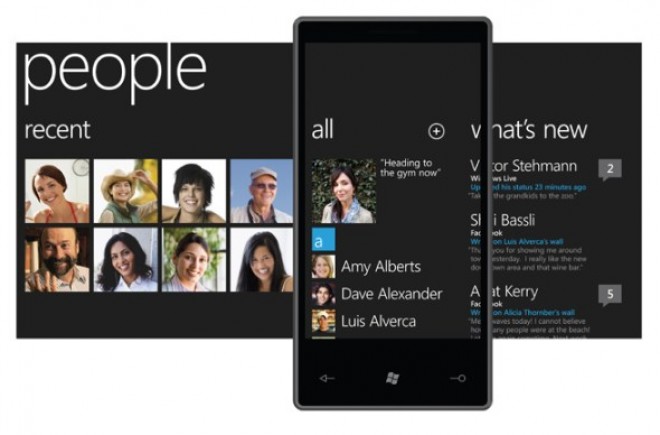
window phone peopleBut if you want to do more than that, you’ll need to download the apps.

Microsoft’s WP8 Facebook app is… good, mostly. It takes advantage of all the lovely UI flourishes of the OS, and it acquits itself nicely in terms of performance and stability thanks to a recent update. You shouldn’t have any trouble drilling down into friends’ profiles, but it has a learning curve seeing as it’s so wildly different from iOS and Android’s presentation.
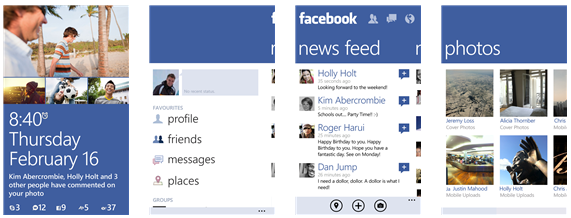
wp8 ui facebookMuch the same can be said for LinkedIn–you can search for new contacts and explore colleagues’ profiles at a whim. As for Skype, well…  it can’t hurt that Microsoft owns the company. As such, they’ve baked some of its features into the OS by allowing you to make voice and video calls from within the People Hub, but you still (somewhat inexplicably) need to download the official app before that integration can happen. It’s strange, but Skype for Windows Phone 8 is still in Preview so hopefully future iterations will improve on said weirdness.

Tweeting with the best of them

Windows Phone’s Twitter app, on the other hand, is mediocre at best. It approaches tweeting in a rather bare-bones way, making it hard to do some of the things even casual tweeters have become accustomed to.

But, much like iOS and Android, Windows Phone doesn’t lack for a few great, full-featured Twitter clients for people who need a little more.

I’m recommending two.

First, Rowi is a fan-favorite among Windows Phone users, and the acclaim is well-deserved. It’s interface is clean and lightweight enough to get out of the way of your feed when you just want a quick look, but can edit photos, translate tweets via Bing, and save articles for later via apps like Instapaper and Readability.
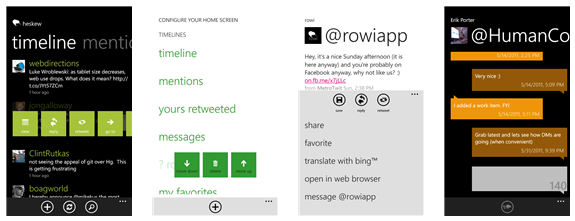
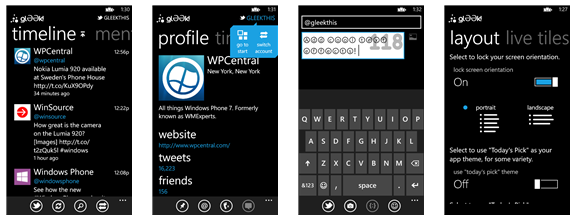
wp8 rowiMeanwhile, glƏƏk! gets points for trying to stuff as much functionality as it can into an already fine app. While it has lower information density, the app can do just about everything Rowi can do while throwing in voice controls, lock screen images, and a live tile for when you want to check what retweets you’ve gotten. And the dev team is very supportive.

wp8 gleekTumblr-ing along

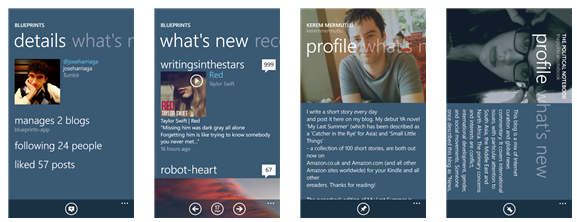
Where else will you find your favorite gifs? Tumblr doesn’t have an official offering on Windows Phone, and that’s unfortunate. Thankfully, it isn’t really missed since Blueprints is such an excellent alternative. The app can handle multiple Tumblr blogs attached to the same account, and you can do anything from check your favorite longform blogs to trip down the meme rabbit-hole. Highly recommended.
wp8 blueprints

We actually need those stinking badges…

If checking into new places is your thing, it’s a good bet you’ve used something like Foursquare before to find restaurants, venues, and night spots you and your friends might love. So it’s a good thing Foursquare has been on Windows Phone since forever. It’s less good that the official app itself is a laggy, buggy mess.

Luckily, the third-party app 4th & Mayor is a worthy surrogate. It’s minimal and nimble, letting you earn your badges and drink in peace. Exactly what the proprietary Foursquare app should be.
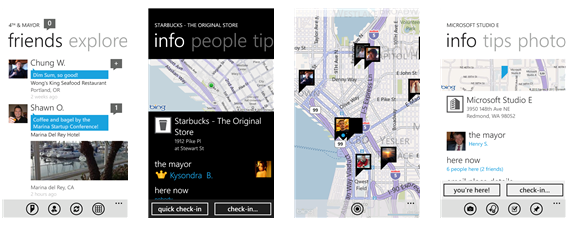
4thandmayor wp8

Redditors, rejoice!

If you truly understand and appreciate what it is to be a part of the Internet — as funny and scary a place as it can so often be — you must visit Reddit from time to time. You don’t have to be a Redditor or even a card-carrying member of 4Chan, but only understand that Reddit is a microcosm of the Web at large. Therefore, Windows Phone had to find its way there. It’s a rule.

Baconit accomplishes that with considerable aplomb. It has everything; you can login, contribute, and troll subreddits to your heart’s desire. The way it renders comments with content can be a little unwieldy at times, but you’d be hard-pressed to find a better client than this.
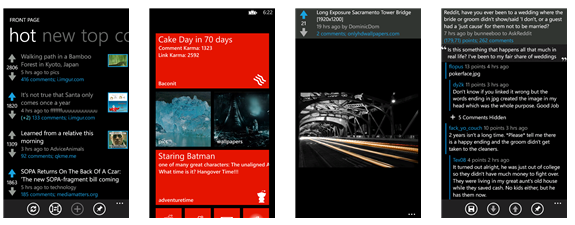
 wp8 baconit

Wherefore art thou, Instagram?

Ah, Instagram! Well, first and foremost, no, there is no Instagram client for Windows Phone. What’s more, the way Instagram handles its API means that there are no third-party apps that will allow you to contribute to the service. Seeing as Instagram is swiftly becoming one of the tentpole apps for both iOS and Android, that Windows Phone 8 has been left in the dark is a problem that needs to be fixed sooner rather than later.

Or maybe not. Considering the entire ToS imbroglio, maybe you don’t need Instagram anymore and want an alternative. Lomogram is probably the best you can do, and that’s not so bad. It has more than 40 filters, light effects, borders, and all the horrid hipster things we love, but without the iffy privacy issues users might be worried about.
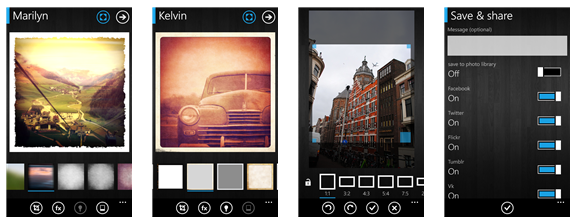
wp8 lomogram


Source : digitaltrends[dot]com

ZTE Grand S First Leaked Image Appears

We’ve known that ZTE is also working on a 5-inch 1080p smartphone for a little while now, but it seems that the first press shot of the ZTE Grand S has now surfaced.

Not much is known about ZTE’s phone, other than they are clearly aiming at a more premium market than most of their devices are targeted at. Considering most of the announced 1080p smartphones we’ve seen have had quad-core processors and around 2GB of RAM, it is probably safe to say this will be similarly equipped.

It is confirmed at this point that the ZTE Grand S will be making the rounds at CES 2013, so we will likely have much more information about the handset at that time.


Source : mobilemag[dot]com

Best free antivirus software

Check out our picks for the best free antivirus software so you can rid your system of possibly damaging adware and other malware.

We all know there are tons of impending viruses and other malware just waiting to wreak havoc on our computers. From worms to Trojans, malware saturates the software landscape. Luckily, there’s just as many free antivirus programs to combat the threat of an impending invasion. If you’re looking for protection but don’t want to shell out the money for peace of mind, you’ve come to the right place. We’ve rounded up some of the best free antivirus programs that money doesn’t have to buy.

Ad-Aware Free Internet Security

Lavosoft’s Ad-Aware is one of the most trusted spyware tools and has been a benchmark in the industry for years. The free version provides real-time anti-virus and malware protection, and the latest in emulation technology and identity protection. Also featuring a scheduler, Lavosoft is excellent at continually updating software based on user concern. It even has a silent “game mode” option to subdue those pesky pop-up notices we all know and loathe.

Adaware Antivirus

Malwarebytes Anti-Malware

Much has happened since Malwarebytes first introduced its application back in early 2008. Now boasting a whopping 200 million downloads worldwide (and counting), Malwarebytes offers quite a bit more for the nonexistent price tag. It continues to provide advanced malware protection and quick removal while utilizing Chameleon technology to get the application running on already infected systems. When malware blocks Malwarebytes from running properly, the software triggers the “mbam-chameleon” app that helps install and update the necessary drivers required for the program to run. The app then targets the processes that blocked Malwarebytes from running in the first place before scanning for other threats. Access to the knowledgeable support network and the slew of language options are an added perk to the free software. The paid version, which costs $25, opens up real-time scanning and a scheduler for updates and scans.

Malwarebytes Screenshot

Microsoft Windows Defender

This software has slowly been improving over the years, and we think it’s finally worth a look. Microsoft Windows Defender offers real-time protection against spyware and pop-ups, and helps improve overall performance. Its monitoring system recommends actions when urgent attention is required, but interruptions are minimal, which helps you stay on task. The software supports 64-bit platforms, updates quickly, and sports a simple user interface.  You can also schedule your scanning and removal times to a time that’s convenient for you. Be sure to check the system requirements as Windows Defender no longer supports Windows 2000 or any other prior version of the Windows operating system.

Windows Defender Screencap

AVG Free Anti-Virus

This popular free anti-virus software packs something extra: free anti-spyware protection built right in. It isn’t as potent an anti-virus solution as some free competitors, like Avira AntiVir Personal, but the spyware detection makes a compelling bonus, especially considering that most anti-virus companies (including Avira) only bundle that functionality into their paid packages. At $50, the paid version offers protection for instant messages, email, downloads, and identity theft, as well as phone support. A mobile version of the software with added incentives, such as a remote wipe and a phone locator, is also available for Android smartphones.

AVG Free Antivirus Screenshot

Avast AntivirusAvast Free Antivirus

Avast Free Antivirus isn’t as quick or intuitive as its paid counterpart, Avast Pro Antivirus, but it certainly does the trick on a budget. Aside from the usual virus and spyware protection, the software comes with a slew of customizable installation options that you can toggle, as well as an Auto Sandbox that places programs deemed suspicious aside so they don’t harm your computer. It also dons a visually appealing UI and contains a comprehensive remote assistance feature that allows you to establish a connection with other users when you need a bit of help. The program’s customizable options cater to the more tech-savvy crowd, but the default settings will do just fine for any beginner.

Panda Cloud Antivirus

What sets Panda Cloud Antivirus apart from its competitors is in the name: the cloud. The program primarily uses cloud computing, meaning remote servers carry the weight of scanning and carrying out various antivirus functions so your computer doesn’t have to. The software is relatively lightweight – it doesn’t require much in the way of resources – and runs off a local cache when the network is unavailable. It also provides options for Web filtering along with optimized and custom scanning to isolate specific folders and files. It doesn’t get much simpler than Panda Cloud Antivirus, but simplicity sometimes comes at a cost; the software is notorious for bogging down your system. The ad-free paid version ($30) features multilingual tech support, a community firewall, and automatic USB vaccination that helps protect against potentially harmful files found in portable storage devices.

Avira AntivirusAvira Free Antivirus

Independent tests from AV-Comparatives.org consistently place Avira near the top of the list for detection rates – and the latest software is no exception. When it comes to viruses, worms, and Trojans, Avira Free Antivirus offers solid protection and performance while maintaining a sleek user interface that is easy to navigate and customize depending on your level of expertise. Although a bit slow depending on the amount of data stored on your machine, scanning is well-optimized and hassle-free once underway. However, some aspects of the software can be overly complicated at times and the accompanying toolbar is a double-edged sword, adding greater security bundled with ads.

Avira Antivirus


comodo antivirus boxComodo Antivirus Free

Comodo Antivirus Free provides a solid line of defense against typical malicious threats like viruses and other malware. It also protects against other infectious sources, including email, instant messaging, and gaming. Its built-in detection technology, Defense+, prohibits anything to run other than the most trusted software, and comes with a barrage of warning alerts. Other features include Auto Sandbox, and a firewall (even in the free version). Although the software may be a bit paranoid, upping the ante when it comes to over-the-top malware detection, it falls a bit short when it comes to disabling what it has deemed potentially hazardous. 
Comodo Antivirus Screenshot

What do you think of our best free antivirus software list? Did we miss anything? Let us know in the comments below.

[Main image via Pavel Ignatov/ShutterStock]


Source : digitaltrends[dot]com

New BlackBerry 10 phone with a QWERTY keyboard spotted

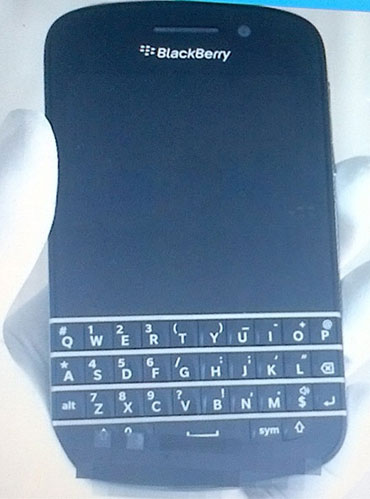
BlackBerry's new N-Series QWERTY smartphone has been spotted just a month left before launch day.

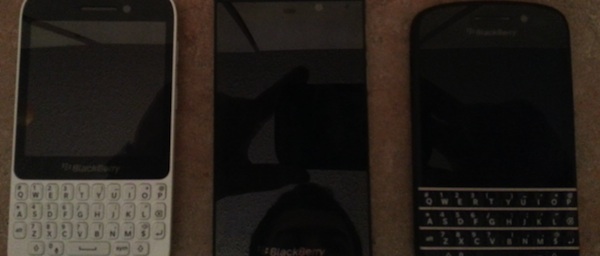
With a January 30th release date just over a month away, screenshots and photos of BlackBerry’s new OS 10 software, including a variety of device photos, are making their way to the web, giving us a preview of what RIM will be hoping to sell by the end of January. The BlackBerry N-Series, which has a QWERTY keyboard, hasn’t gotten much attention from the leaked images department, but it looks like the N-Series has got a shot. In these shots, found by CrackBerry, it looks like a taller, more handsome BlackBerry Bold with a larger display, full QWERTY keyboard, and front camera.

The N-Series, possible known as the BlackBerry X10, was also seen in a lineup alongside the BlackBerry Z-10, and another unknown QWERTY BlackBerry device. As per BlackBerry OS 10′s claims, all the new devices will feature a new sensual UI, powerful messaging features, and supposedly up to 30,000 apps on launch day. One things for sure: From now until January 30th, all eyes in the mobile world will be on RIM’s last ditch effort to amaze us with BlackBerry OS 10. Does anyone think Obama will upgrade?


Source : digitaltrends[dot]com

Life and Tiles of a Windows 8 Convert: My Windows Phone honeymoon begins

Windows 8 phone

In the second article in our weekly Life and Tiles of a Windows 8 Convert series, Andrew details his first days, and instant crush on Windows Phone 8 and the Nokia Lumia 920. But will this love affair last?

Life and Tiles drop cap

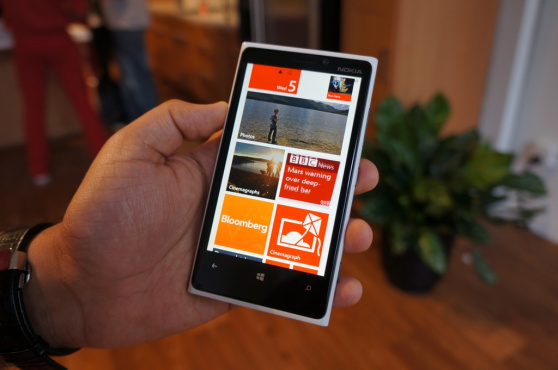
Due to circumstances beyond my control, securing a Nokia Lumia 920 in Canada (my Northern home) was an unfairly hellish affair. It was two full weeks before I finally held that hulking, black slab in my sweating palms, but it was worth it. I was in love. Though my knuckles dragged on the pavement, unable to support the tremendous weight of Nokia’s latest brick, I was assured it would get easier by my sales rep, Kelly, who flashed her own Samsung Galaxy Note 2 at me. A week or so later and it seems her prediction has come true. Not only have I adjusted to the Lumia, but I am flourishing. I’m enjoying the Lumia’s bulky build and actually find it more comforting than a lighter device. The Lumia 920 feels solid, built to last, meant to conquer.

The whole experience has been surreal, like I have been let into an exclusive, underground club. I show my phone off at every opportunity, making sure I check my Twitter feed in the most conspicuous way possible. I smirk as friends marvel at the Lumia’s bold design and rainbow-colored operating system. They ask things like “What kind of phone is that?” “Is that the new iPhone?” “Can I hold it?” and I humor them, handing my Lumia over so they can swipe through the foreign-looking Live Tiles. As kindly as possible, I break the news that what they are holding is not the next iPhone. Most are surprised to hear Microsoft is behind the operating system.

This all sounds very self-absorbed and ostentatious but coming from an iPhone 3GS – after a brief affair with a Nexus S – the Lumia 920 is paradise. At least, for now. Why shouldn’t I share that experience with everyone that comes within ten feet of me? Yes, it’s obnoxious and probably annoying as hell, but I feel like it’s my duty to spread the word.

My Lumia and I have our own fun too, it’s not all about the glitz and glamor of popularity. I have spent hours downloading new apps and experimenting with Live Tile configurations. The core software is speedy with hardly a hiccup. Most of my core app needs are met as well: LinkedIn, Twitter, Facebook, etc. It’s not all perfect. Some of my favorite apps, like Pocket and Dropbox are missing, which I am struggling to live without. I bought Angry Birds Star Wars (my new favorite version of the popular physics game) and basked in the supersized screen. Obi Wan “Bird” Kenobi soared effortlessly through the air before blasting through a tight group of piggies. It was like freedom in on a 4.5-inch screen.  

The standout aspect of Windows Phone 8 is its fluidity. WP8 is leagues ahead of Android in terms of stutter-free animations. Apple’s iOS is generally smooth as well, but WP8 still feels faster, even if it is grounded more in perception than reality. Not only is WP8 it fluid, but it’s also one of the most visually consistent operating systems on the market. Design elements like the cut-off text and a focus on typography remain prevalent throughout the user experience. Core apps like Phone, Mail, and Messaging all showcase this minimalist approach to smartphone software with impressive results. Some third-party apps succeed at this, but others need work. Even with a lackluster turnout from developers, it is an impressive feat for a relatively new mobile platform – Android only recently implemented a cohesive design. Consistency was never a problem in iOS, and Windows Phone is finally up to snuff.

The cloud storage offered by Microsoft Office has already proven itself to be useful. The other day I was in a coffee shop working on an article and instant messaging with my editor. In the middle of our in-depth discussion, catastrophe struck (an event I will delve into at a later article) and I was forced to hastily vacate the premises. I had no time to alert my editor of the situation as I quickly slammed my laptop shut, grabbed my bag, and ran out. On the way to another, more secure location, I pulled out my Lumia 920 from a pocket and picked up right where we left off. The conversation was synced with the cloud so I was able to tell my editor what happened. And as we continued to chat, I used my Lumia to open the document I had been working on along with some point form nonsense in OneNote. This might seem commonplace, files syncing in the cloud, but it was the way it came together that has me falling for the platform. I didn’t have to specifically save my document to SkyDrive because that happened automatically. My smartphone knew it was the most recent document I had been working on and provided a link to it when I opened the Office app.

It may be too early to tell, but it feels like this is truly Microsoft’s time to shine. 

Stay tuned next Monday for the next edition of Life and Tiles, where Andrew’s WP8 honeymoon comes to a halt. To catch up, read the entire Life and Tiles of a Windows 8 Convert series.


Source : digitaltrends[dot]com

It's free
index