Mozart may be first in line at HTC to receive Windows Phone 7.8

Mozart may be first in line at HTC to receive Windows Phone 7.8

Music to Mozart's ears?

The HTC Mozart may be the first handset in the Taiwanese firm's fleet to received the Windows Phone 7.8.

That's according to Polish site Windows-Phone.pl, which claims to have spoken to an (unconfirmed) HTC employee who revealed the news.

Now our Polish isn't the best, but we believe the source said something along the lines of "currently the HTC Mozart is the only phone which has been confirmed for the Windows Phone 7.8 update."

All WP7 devices in the running

The employee went on to reveal that the update would start rolling out towards the end of February or the start of March, which would correspond with reports suggesting the update will arrive with manufacturers at the end of January.

TechRadar has spoken to HTC and a spokesperson told us: "We are currently reviewing our upgrade plans for our Windows Phone product portfolio, but don't have anything to announce at this stage.

"In terms of the update, we can say that this is a Microsoft update, which will therefore roll out to all Windows Phone 7 devices."

However, it seems that there is some manufacturer influence: LG has previously admitted the Optimus 7 won't be getting the update any time soon, so it seems the brands are completely hands off with their handsets.


Source : techradar[dot]com

No buttons, no problem: Here’s how touchscreens work when you can’t see

how touchscreens work when you can’t see

The world loves smartphones and tablets, but what if you – or someone you know – can’t see see a display, hear feedback, or even touch the screen? Surprisingly, a number of brilliant workarounds exist to keep you connected.

I have a confession: I don’t like touchscreens. My fingertips have thick callouses from years of playing music. Some smartphones and tablets do better than others, but I often can’t make them work without pressing hard or tapping with a bent knuckle.

Other people find smartphones and tablets even more frustrating. Imagine not being able to hear audio cues or unlock a device. A two-fingered swipe or pinch isn’t effortless with osteoarthritis or with a finger in a cast. The World Health Organization estimates 295 million people worldwide are visually impaired, and nearly 40 million are blind. Ever answer a call or check Twitter without seeing what you’re doing?

Mobile devices don’t have to leave people behind. We’re still a long way from making mobile devices equally useful to everybody, but assistive technology has come a long way. Here’s how today’s latest mobile devices user clever software to overcome a lack of sight.

Back in the day

Yaesu 901dm transceiver

My first tech accessibility experience came as a teenager by way of Bill Navarte, a blind ham radio operator. I’d sometimes help him set up new gear and mark the knobs and switches, usually by notching them with a file or applying bumps of enamel paint. He had a system, and we documented it all in Braille. He could find and operate almost everything by touch.

Today, that approach doesn’t work because most devices have just a few multifunctional controls — it might be great industrial design, but many people are locked out. Bill’s now retired, but minces no words. “I can still run my ham station,” he told me via telephone, “but I can’t work the new stereo. Over Christmas I spent an hour trying to change the radio. It got into some ‘CD’ mode, but there was no way I could tell.”

Smartphones and tablets are worse: they have only a few physical buttons, and any part of a touchscreen can do almost anything. Mobile devices could be designed around accessibility, but it’s difficult: What might work for the deaf doesn’t work for the blind, and what works for the blind may not help folks who have difficulty with touch. So, accessibility focuses on adapting devices designed for the fully abled.

Apple and iOS

Right now, Apple is an undisputed leader in mobile accessibility.

iPad (VoiceOver rotor)

“Apple wants to make its products accessible and can,” noted Toronto-based author and accessibility expert Joe Clark. “Accessibility is built into every single item Apple sells that remotely resembles a computation device, save for the iPod Classic. Apple values user experience. Not being able to use a product makes for a shitty experience.”

VoiceOver is the flagship accessibility feature in iOS. It’s easy in theory: Just drag a finger around the screen to have VoiceOver speak items. Double-tapping activates buttons, and simple gestures let users move between objects. VoiceOver has a learning curve (and any screenreader is usually a mind-bend for sighted users), but it’s remarkably effective. VoiceOver may be most stunning browsing the Web. Users can drag their finger around a page to pick up layout and contextual cues, and VoiceOver has an innovative “rotor” control gesture (think of turning a knob) to concentrate navigation on headings or lists or zoom in to read (or edit) character-by-character. Pop in an earbud and VoiceOver is silent to anyone nearby, and a three-fingered triple-tap hides the display: No worries about someone reading over your shoulder.

iPad Assistive Touch (Pinch)

“My eyes are fine,” says Katherine Macquire, an office manager at a Seattle-area consulting firm, “but at work I use VoiceOver with a headset and the blank screen to keep in touch with my [homebound] mother. I love it. It’s totally private.”

VoiceOver works with the onscreen keyboard, speaking each character when it’s touched: just touch again to confirm. Entering text using VoiceOver takes time — but (with an Internet connection) users can also dictate into most apps.

Apple’s iOS also offers zoom and color inversion that work in any app. Text can also be enlarged, but only in Apple’s core apps like Mail, Contacts, and Messages. For people (like me) who struggle with gestures, Assistive Touch enables one-finger pinching, multi-finger gestures, and the equivalent of programmable gesture macros.

Google and Android

Google has been working on Android accessibility almost as long as Apple, with the first features appearing in Android 1.6 “Donut.” The results have been mixed, and when Google adds new features (as in Android 4.x) there’s no knowing if device makers or carriers will make them available.

Eyes-Free Keyboard (Android)

Out of the box, Android accessibility was minimal before version 4.0 (“Ice Cream Sandwich”). Forget the touchscreen: Low-vision users need a physical keyboard and pointing device (like a directional pad) to get around. Most Android devices include three main accessibility features: TalkBack uses speech synthesis to describe events and actions, KickBack can vibrate gently when a user finds a control (useful for lock screens), and SoundBack provides audio feedback moving to a new control. Google also offers Eyes-Free Shell for accessing home-screen functions. These tools are available via Google Play — but, weirdly, they’re easier to get via the IDEAL Accessibility Installer. Many Android users prefer third-party tools like the Eyes-Free Keyboard (it has an on-screen directional pad, and while it chokes on menus and dialogs, it works for navigation) or Speil, an alternative to TalkBack. Folks with serious text-to-speech needs usually turn to third-party apps like SVOX’s Classic Text to Speech.

With Android 4.0, Google introduced Explore by Touch, which can identify onscreen elements when users drag over them. There’s also gesture-based linear navigation, and, like VoiceOver, TalkBack in Android 4.x works with Web content. This version of Android also makes the on-screen keyboard accessible: Users can move over letters then lift when they find the one they want. Android 4 aids low-vision users with options for larger type, inverted colors, and some pinch-to-zoom items.

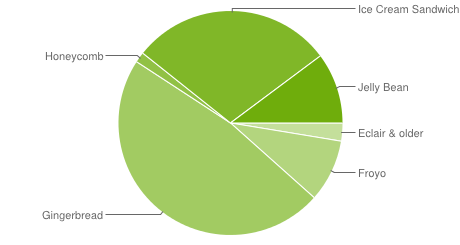
Android version fragmentation Jan 03 2013

Sounds great, but Android 4.x represents only about 40 percent of active Android devices today: More than half are Android 2.2 and earlier, including brand-new devices still being sold. There’s no guarantee any of these tools work with Samsung TouchWiz, HTC Sense, or other skins. For older versions of Android there’s no strong screen reader for browsing the Web.

“Android could have the same desire Apple has to make products accessible,” noted Clark, “but even that would not result in accessibility due to device fragmentation and a seriously outdated user base.”

How to cope

Voice commands and speech recognition (like Siri and Google Now) would have been accessibility features a few years ago; today they’re mainstream. Similarly, many hearing-impaired mobile users use FaceTime, Google Hangouts, and Skype video chat for signing or reading lips, when no one considers those services adaptive technology.

Stevie Wonder famously proclaimed “there is nothing that you can do on the iPhone or iPad that I can’t do.” That’s not strictly true — thousands of iOS apps aren’t accessible, and many Android users get by just fine with available accessibility options. But, right now, Apple is the out-of-the-box leader for general mobile accessibility.

Users who prefer Android are probably best-advised to look at Google’s Nexus phones and tablets. Their unadulterated Android works best with Google’s accessibility options and doesn’t depend on carriers for updates: it’s also the best bet for third-party accessibility apps.

In the meantime, take a look at what mobile accessibility can do for you — it should be a pleasant surprise.


Source : digitaltrends[dot]com

Apple boss addresses rumor of iPhone component cuts (sort of)

Apple is usually content to leave the rumor mill churning away, happy for the publicity. A recent report suggesting the company had ordered a cut in orders for iPhone 5 components has, however, elicited a response.

Apple posted a mixed bag of results on Wednesday for the quarter ending December 29, 2013. Granted, they were the kind of sales figures most companies would die for, but with Apple comes high expectations. Sure, they sold millions of iPhones and iPads – 10 iOS devices a second, apparently – but investors and analysts expect the company to go beyond their forecasts, to smash records, to leave them with their jaws planted firmly on the floor.

During the earnings conference call following the release of the results, Apple boss Tim Cook took the unusual step of commenting on an Apple rumor. No, not the one about the iPhone Math or cheaper handset. They evidently don’t matter to the Cupertino company so much.

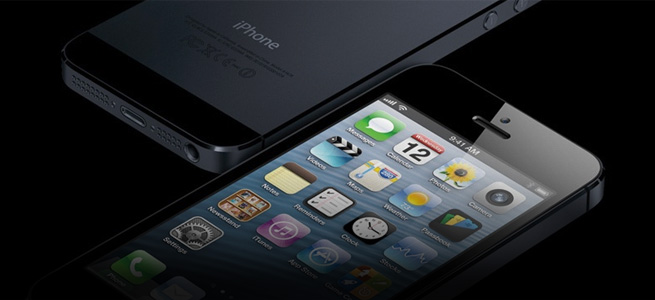
Cook picked up on a more damaging story, one that emerged earlier this month suggesting that the tech giant had ordered a significant cut in orders for iPhone 5 components because of “weaker-than-expected demand” for the handset.

Addressing the report, Cook said it was important to “question the accuracy of any kind of rumor about build plans.”

However, during his comments, he didn’t outright confirm or deny the talk of a cut in orders, adding, ”Even if a particular data point were factual, it would be impossible to accurately interpret the data point as to what it meant for our overall business, because the supply chain is very complex and we obviously have multiple sources for things.”

He continued, “Yields might vary, supplier performance can vary, the beginning inventory positions can vary, I mean, there’s just an ordinate long list of things that would make any single data point not a great proxy for what’s going on.”

His comments may have left analysts none the wiser, but some investors, looking at the results for the quarter as a whole, saw fit to offload at least some of their stock. After-hours trading on Wednesday saw Apple shares fall over 10 percent to around $460 – their lowest value in about a year and a figure well below their $700+ peak back in September.


Source : digitaltrends[dot]com

Android 4.1 Jelly Bean update hits international Galaxy S2 smartphones

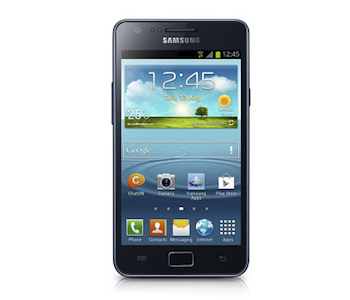
Samsung Galaxy S2 Plus Front

Samsung has reportedly begun sending its Android 4.1 update out to selected Galaxy S2 smartphones. Initially for unlocked devices, the software adds many new features and a new, Galaxy S3-style look to the phone.

Reports are coming in from Galaxy S2 owners in the UK and Europe that their phones are now receiving the Android 4.1 Jelly Bean update. The new software has, like most Android version updates, been a long time coming. Announced in September last year, it only became clear at the beginning of this month that its release was imminent.

According to SamMobile’s update tracker, Jelly Bean is now available in China and Spain, however a reader from the UK has informed KnowYourMobile his Jelly Bean update was live on the evening of January 23. A quick check on Twitter shows many Spanish S2 owners tweeting about their newly updated phones, along with several from the UK too.

Android 4.1 Jelly Bean for the Galaxy S2 contains a wide range of new features, plus a version of the Nature UX seen on the Galaxy S3 and the Galaxy Note 2. Several other features from these two devices will also arrive on the S2, including Pop-Up Play and Smart Stay. Samsung’s new Galaxy S2 Plus also gave us a hint at what the update would bring to the original S2, as its specification is identical to the first model. It also features the Nature UX, plus Google Now, Direct Call and S Voice.

Initially, the discovery of a Samsung webpage which provided details of the Android update warned it would only be available through Kies, Samsung’s device management software; however this may not be entirely accurate. If you have an unlocked Galaxy S2 GT-i9100, have a check of Software Update to see if an over-the-air version is available.

As you’d expect, it’s these carrier-free Galaxy S2 phones which will get the update first, but those locked to a network are sure to follow in the future. If your phone has been officially Jelly Bean’d, let us know in the comments.


Source : digitaltrends[dot]com

Samsung Ativ Odyssey comes to Verizon today, faces stiff competition from the Nokia Lumia 822

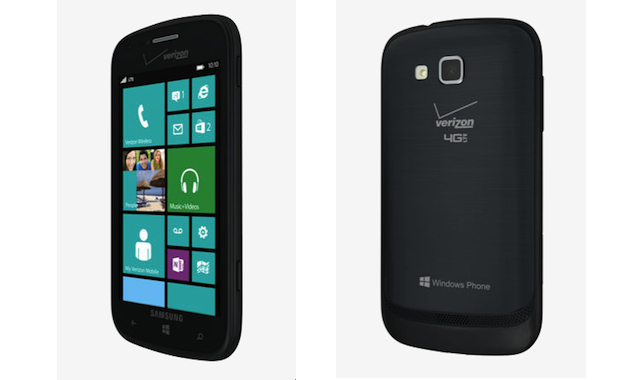
Samsung Ativ Odyssey Release

Verizon has announced the availability of the Samsung Ativ Odyssey, the latest addition to its range of Windows Phone 8 hardware, however it faces stiff competition from the Nokia Lumia 822.

Finally, the Samsung Ativ Odyssey’s journey is over, as it’s available to buy from Verizon today. The Ativ Odyssey has lived up to its name too, having been announced way back in October 2012 before disappearing, only to reappear occasionally in other stories until the beginning of this month at CES 2013. There, Verizon confirmed it would be bringing the Samsung Windows Phone 8 device to its network, but failed to provide a launch date.

It has now sprung the news on us just hours before the Ativ Odyssey was put onto shelves, so if you were waiting for Samsung’s little bundle of joy, then it should be for sale both online and in stores now. All the time we were waiting for some solid information on the Ativ Odyssey’s release schedule in the U.S., we’ve been hoping it would be the free Windows Phone handset Verizon promised to provide. Sadly though, the Ativ Odyssey isn’t it, however it’s up against one that is.

It’s not going to break the bank though, as it’s yours for $50 after a $50 mail-in rebate, and provided your scribble your signature on the bottom of a two-year contract. That puts it in the same price bracket as the Verizon-exclusive Nokia Lumia 822; which is bad news for the Samsung phone.

The 4G LTE Ativ Odyssey has a 4-inch touchscreen with a 480 x 800 pixel resolution, while a 1.5GHz dual-core Snapdragon processor with 1GB of RAM powers the Windows Phone 8 operating system. The spec list continues with a 5-megapixel camera, 8GB of internal storage memory, a 1.2-megapixel video call camera, a 2100mAh battery and a microSD card slot.

You may recall the Lumia 822 dropped in price, from $50 to $0 with a two-year contract, just before Christmas. Why is this bad for the Ativ Odyssey? The Lumia 822 offers a 4.3-inch screen, an 8-megapixel camera, 16GB of internal storage space and can connect to Verizon’s 4G LTE network. The choice is yours, then, but we’d take a good look at both phones before making a decision. You can read our hands-on report of the Lumia 822 here.


Source : digitaltrends[dot]com

It's free
index